

This blog series focuses on presenting complex DevOps projects as simple and approachable via plain language and lots of pictures. You can do it!
These articles are supported by readers, please consider subscribing to support me writing more of these articles <3 :)
Hey all!
It’s been a while! I’ve been busy migrating Vera, my agentic AI helper, over to AWS AgentCore.
This article is part of a series:
Part 1 (this article) - AgentCore: Full Architecture and Code
Part 2 - AgentCore MCP Gateway
Part 3 - AgentCore Memory and Tools
Part 4 - AgentCore Deployment, Operations, and Lessons Learned
AgentCore has a few very cool features that made it attractive for migration, including:
Longer running jobs: Can run for 8 hours! Much longer than Lambda’s 15 minute hard limit
Avoiding cold starts: Lambda starts from scratch each time (with some exceptions for warm more expert-tier stuff), so having the bot ready to go is helpful
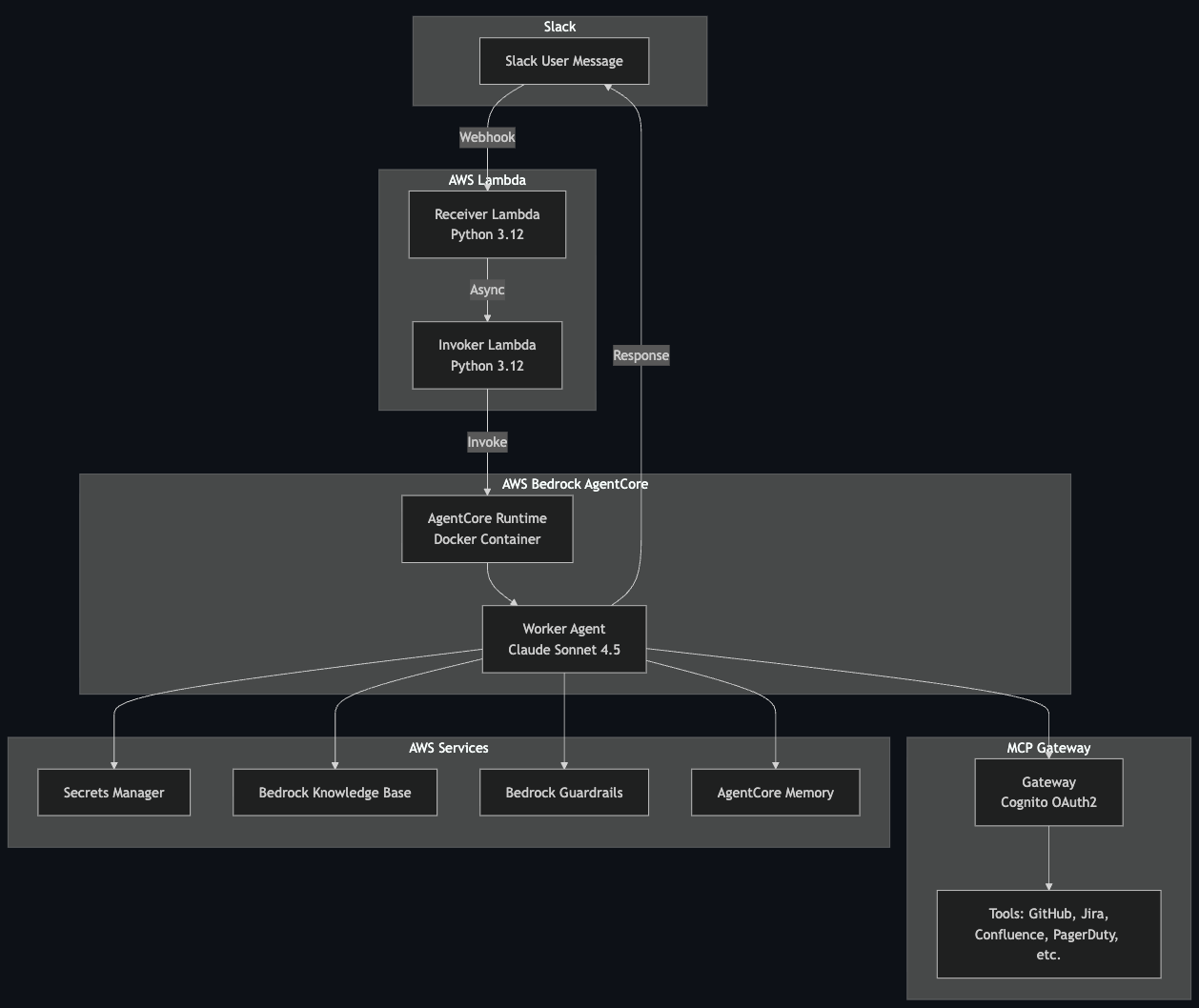
I’ve been building AI bots for enterprise use for a while now, and if you’ve been following along, you’ve seen the evolution. We started with a genAI Slack bot (https://www.letsdodevops.com/p/solving-aws-bedrocks-enterprise-logging) that could answer questions using RAG and knowledge bases. Then we leveled it up to an agentic Slack bot (https://www.letsdodevops.com/p/building-agentic-slack-bot) that could actually do things - query GitHub, check PagerDuty, search Jira.
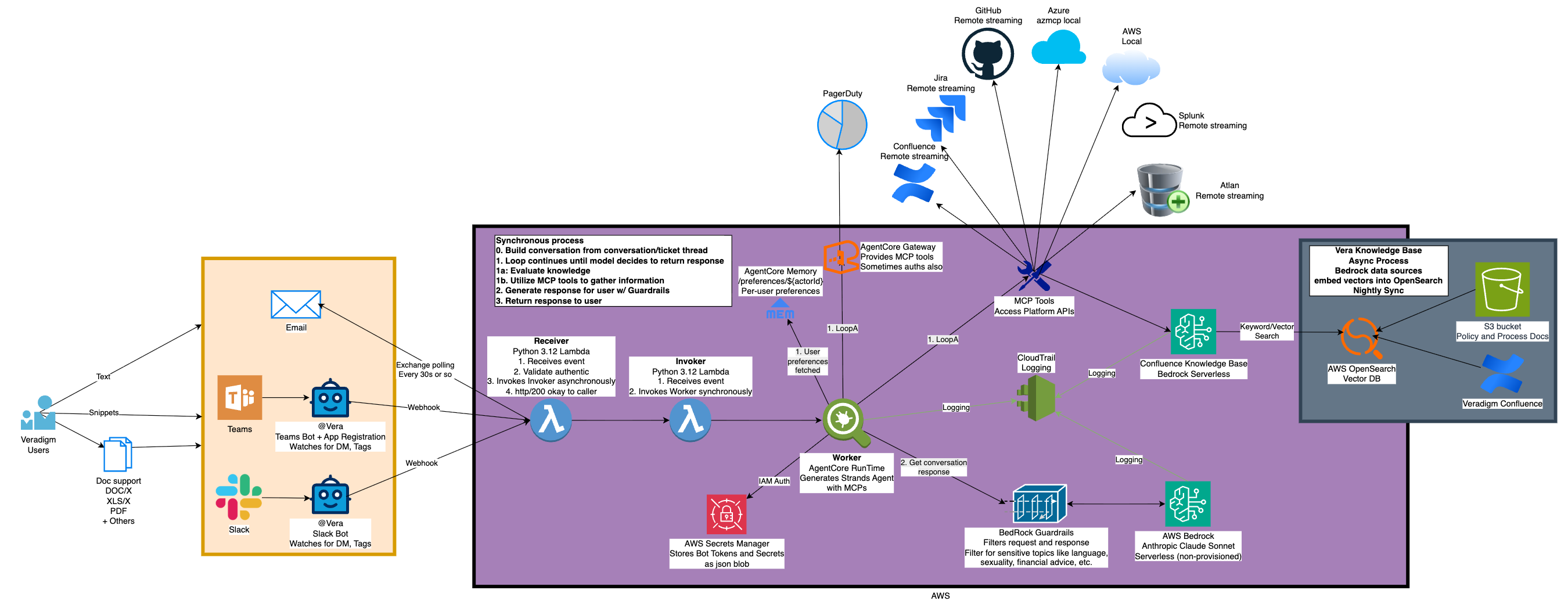
Here’s the thing: that Lambda-based agentic bot? It works great. Seriously. Lambda with the Strands SDK running Claude can handle complex multi-tool workflows without breaking a sweat. If you’re building an agentic bot today and Lambda fits your needs, go for it.
But.
Lambda has a hard 15-minute timeout. For most agentic workflows, that’s plenty. But what happens when someone asks your bot to analyze a quarter’s worth of incidents, cross-reference them with deployment logs, and generate a report? Or when the agent needs to iterate through dozens of GitHub repos looking for a specific pattern? Those workflows can push past 15 minutes, and when Lambda hits that wall, it hits it hard.
Beyond the timeout, I kept hearing about AWS Bedrock AgentCore and its growing feature set. Memory that persists across conversations? A managed MCP gateway for tool access? Multi-agent orchestration? These aren’t things you can’t build on Lambda, but they’re things AgentCore gives you out of the box.
So I decided to migrate. Not because Lambda failed me, but because AgentCore offered a different model - one where my bot isn’t a function that spins up and dies, but an application that stays warm, maintains state, and processes requests like a real service.
This is the first article in a series documenting that migration. We’ll cover:
This article: What AgentCore is and why the “living application” model matters
MCP Gateway - one gateway to rule all your tools
AgentCore Memory - teaching your bot to remember
Guardrails and Knowledge Bases - safety and smarts
Deployment, operations, and lessons learned
Let’s do it.
If you want to skip all this architecture and just see the code, it’s all published here under an MIT license:
The Problem with Lambda for AI Agents
Don’t get me wrong - Lambda is fantastic for AI workloads. I’ve been running agentic bots on Lambda for months, and the model works well:
Pay-per-invocation: You only pay when the bot is actually working
Auto-scaling: Slack blows up with requests? Lambda handles it
Simple deployment: Push code, done
But there are friction points when you’re running long-lived agentic workflows:
The 15-minute ceiling. Most agent tasks complete in 2-5 minutes. But “most” isn’t “all.” When your agent needs to iterate through large datasets, make dozens of tool calls, or wait for slow external APIs, you can hit that timeout. And when you do, everything stops. No graceful degradation, no “let me finish this thought” - just death.
Cold starts during conversations. Lambda containers can be reused, but there’s no guarantee. If your user sends a follow-up message and it hits a cold container, you’re paying the initialization cost again - reloading models, re-establishing MCP connections, re-fetching secrets. It’s not catastrophic, but it’s not elegant either.
No persistent state. Every Lambda invocation starts fresh. Want to remember what you talked about 5 minutes ago? You need to build that yourself - fetch conversation history, reconstruct context, hope you got it right. Lambda doesn’t help you here.
The invoke-and-die pattern. This is the big mental model issue. Lambda wants you to do a thing and exit. Agents want to exist - to maintain connections, hold context, be ready for the next question. These models are fundamentally different.
None of these are dealbreakers. I worked around all of them. But when AgentCore offered a different approach, I was curious.
Enter AgentCore: An Application, Not a Function
AWS Bedrock AgentCore flips the model. Instead of invoking a function that dies after each request, you’re running a container that stays alive.
Think of it like this:
| Aspect | Lambda | AgentCore |
|--------|--------|-----------|
| Lifecycle | Invoke → Execute → Die | Start → Stay warm → Process many requests → Eventually die |
| State | None (rebuild each time) | Maintained in memory |
| Timeout | 15 minutes hard limit | Configurable (hours) |
| Connections | Re-establish each invocation | Keep alive |
| Mental model | Function | Application |
Your AgentCore runtime is a Docker container running on AWS-managed infrastructure. You define how long it can sit idle before AWS kills it (idle_timeout), and how long it can live total (max_lifetime). Between requests, it just... waits. Connections stay open. Memory stays loaded. When the next request comes in, you’re already warm.
This is a fundamental shift in how you think about your bot. You’re not writing a function anymore. You’re writing an application - one that handles HTTP health checks, processes incoming requests on a loop, and maintains state between calls.
The lambda pattern is to handle one single event and then die. The AgentCore pattern is your application spins up at the first request, and then it hangs around to handle other requests.
It’s fully warm, tokens are cached, MCP clients are prepped, and so we now need to understand which pieces of the application are shared vs distinct, and even which pieces of data are sensitive and need to be kept separate between requests.
The runtime stays warm based on your configuration:
# Runtime lifecycle configuration
idle_timeout = 900   # 15 minutes idle before shutdown
max_lifetime = 28800 # 8 hours max before forced restart
AWS manages the health checks. If your container becomes unhealthy, AgentCore restarts it. If traffic spikes, AgentCore can scale. You focus on the application logic; AWS handles the infrastructure.
Architecture Overview
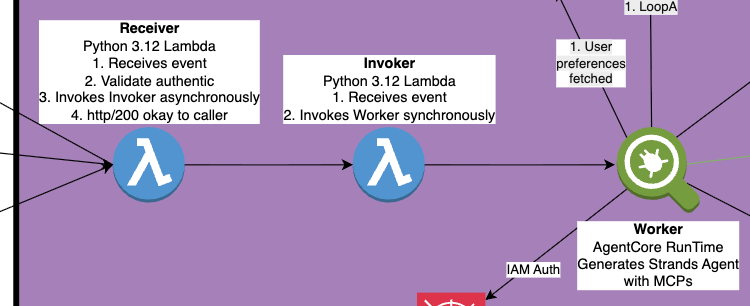
Here’s the thing about AgentCore: you can’t just point Slack directly at it. Slack requires a webhook response within 3 seconds, and your AI agent is definitely not responding in 3 seconds. So we still need Lambda - but in a different role.
The architecture looks like this:
Receiver Lambda
Catches the Slack webhook, validates the signature, and immediately returns 200. Slack is happy. Then it asynchronously invokes the Invoker Lambda. This function is tiny and fast - 128MB, sub-second execution.
Invoker Lambda
Takes the payload and calls InvokeAgentRuntime. This is a synchronous call to AgentCore, but the Invoker doesn’t wait for it to complete - it fires and forgets. The Invoker exists mainly to provide IAM isolation; it has only the permission to invoke AgentCore, nothing else.
AgentCore Runtime
The actual bot. Receives the request, loads conversation history, spins up MCP connections, runs the agent loop with Claude, and posts the response directly back to Slack. This is where the magic happens, and it can take as long as it needs.
Why the two-Lambda dance? Separation of concerns. The Receiver needs to be fast and needs access to validate Slack signatures. The Invoker needs permission to call AgentCore. By splitting them, we follow least-privilege principles and keep each component focused.
What You Get Out of the Box
AgentCore isn’t just “Lambda but longer.” It comes with a suite of features that would take significant effort to build yourself:
MCP Gateway
A managed gateway for MCP (Model Context Protocol) servers with OAuth2 authentication via Cognito. Register your tools once, authenticate once, access everything. We’ll dive deep into this in Article 2.
AgentCore Memory
Persistent memory across conversations. Not just “what did we talk about in this thread” but “what are this user’s preferences” and “what facts have we learned.” Three memory strategies out of the box: session summaries, user preferences, and semantic knowledge. Article 3 covers this in detail.
Multi-Agent Orchestration
This one’s interesting. AgentCore supports agent-to-agent communication and hierarchical agent patterns - think a “manager” agent that delegates to specialist agents. I haven’t implemented this yet, but the capability is there. A supervisor agent could coordinate between a “GitHub specialist” and a “Jira specialist,” each with their own tools and context. Something to explore in a future article.
Container Lifecycle Management
AWS handles health checks, restarts, and scaling. You define the parameters; AWS keeps things running.
The Entrypoint Pattern: From Handler to Application
We were already using Docker containers for the Lambda-based bot, so the Dockerfile doesn’t change dramatically. What changes is how the code runs inside that container.
With Lambda, you write a handler function that processes one event:
def lambda_handler(event, context):
# Process this one request
# Return response
# Container may or may not stick around
With AgentCore, you write an application that stays alive and processes many requests:
from strands.multimodal.application import Application
app = Application()
@app.entrypoint
async def handle_slack_message(payload: dict):
# Process this request
# Container keeps running after we return
pass
if __name__ == “__main__”:
    app.run()  # Start HTTP server, wait for requests
That app.run() call is the key difference. It starts an HTTP server inside the container that:
Responds to health checks from AgentCore
Routes incoming requests to your handler
Keeps the process alive between requests
Your handler gets called for each incoming request, but the container - and everything you’ve initialized - stays warm. MCP connections persist. Cached tokens stay valid. The mental model shifts from “spin up, do work, die” to “stay ready, handle work as it comes.”
What’s Next
This article covered the “why” and “what” of AgentCore. We talked about Lambda’s limitations for long-running agents, how AgentCore’s application model differs, and what features come bundled in.
In the next article, we’ll go deep on the MCP Gateway - how to set up unified authentication with Cognito, register multiple tool providers, and handle the quirks of different MCP servers (spoiler: Azure MCP on ARM64 is... special).
Until then, if you’re running agentic bots on Lambda and they’re working fine, don’t let this article convince you to migrate for migration’s sake. But if you’re hitting the 15-minute wall, or you want persistent memory, or you’re tired of rebuilding MCP clients on every invocation - AgentCore is worth a look.
The code for this entire project is open source: [GitHub link]. Feel free to poke around, steal ideas, or open issues when things don’t make sense.
Happy building!
kyler