

This blog series focuses on presenting complex DevOps projects as simple and approachable via plain language and lots of pictures. You can do it!
These articles are supported by readers, please consider subscribing to support me writing more of these articles <3 :)
Hey all!
We’ve built three AI bots across our organization: VeraSlack, VeraTeams, and VeraResearch. All three run on AWS Bedrock using Claude Sonnet. They answer questions, search knowledge bases, and help employees find information.
When we first deployed these bots, we relied on AWS Bedrock’s built-in logging. Every API call generates a log entry with timestamps and request IDs. Our Lambda functions logged to CloudWatch. We figured we had full visibility. If security needed to audit a conversation, they’d just look at the logs.
The first time our security team asked “What did Bob from Finance ask the bot last Tuesday?” we couldn’t answer it. We had thousands of Bedrock API log entries, but no way to connect them to Bob’s question.
Agentic bots don’t make one API call per user question. They make dozens.
An employee asks: “What’s our process for requesting SSL certificates?” That single question triggers the bot to query the knowledge base, call a reranking service, search Confluence, check PagerDuty, maybe query Jira, synthesize the results with Bedrock, and format a response. That’s fifteen separate API calls across multiple services.
Each API call logs separately. Each log entry is atomic—just a request ID, timestamp, and parameters. No user name. No original question. No conversation context.
To reconstruct what Bob asked, you’d need to find his username in Slack’s event logs, correlate that to a Lambda execution timestamp, connect it to fifteen different Bedrock API calls scattered across log groups, and piece together the conversation.
Pro tip: This is awful, I don’t want to spend all my time reading logs

The problem gets worse with conversational bots. VeraResearch uses Bedrock Agents and can have multi-turn conversations. A five-minute troubleshooting session generates hundreds of log entries. Bedrock logs API requests, but has no concept of “user,” “conversation,” or “session.”
We needed to answer basic questions: What is Bob asking? What information are we providing about sensitive topics? Which bot is being used most? Bedrock’s logging couldn’t answer these.
So we built our own audit logging system. One that captures user identity, the original question, conversation context, the bot’s response, and ties it together with a single session ID.
In this article, I’ll walk you through why platform logging fails for agentic bots, how we designed an audit system across Slack and Teams, and the platform-specific challenges we solved.
It’s Harder Than It Looks
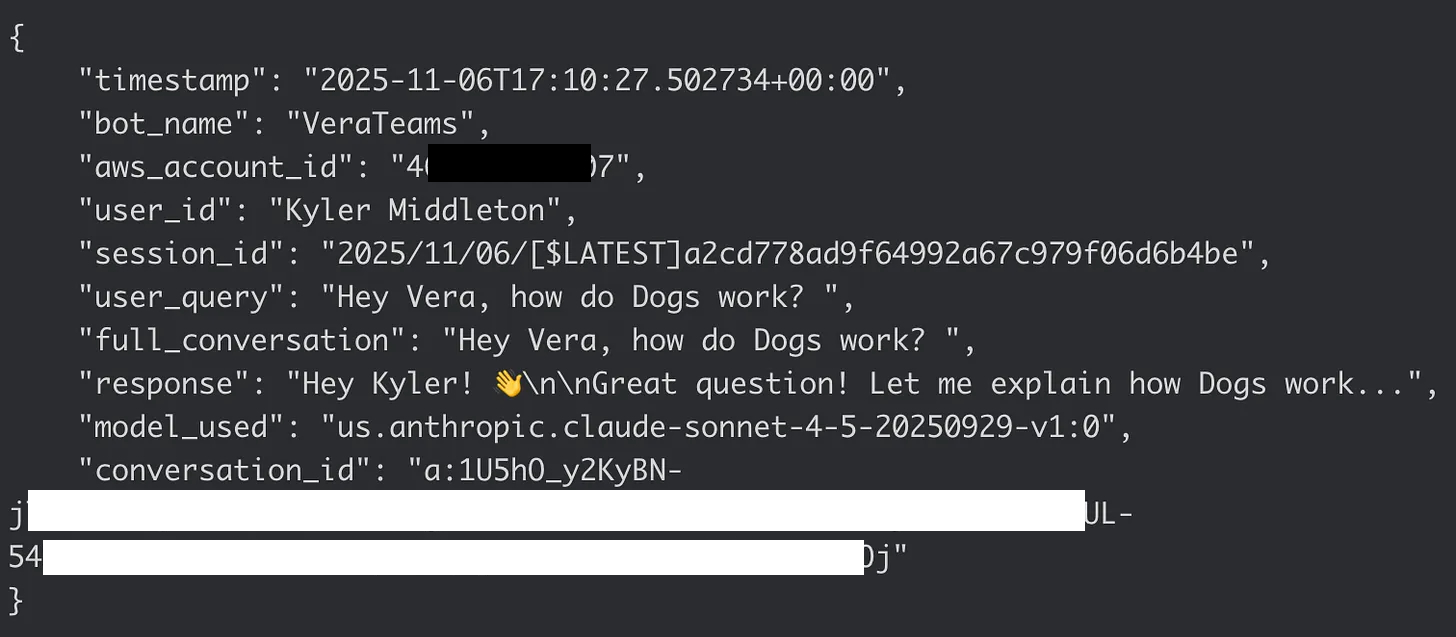
Good audit logging needs specific fields: who asked (user_id), what they asked (user_query), the conversation context, what we told them (response), when it happened (timestamp), and which bot answered (bot_name). We also need the AWS account ID for environment tracking and a session ID that ties audit logs directly to Lambda execution logs.
We’re writing these logs to CloudWatch Logs using a shared log group called /aws/ai-bots/audit-logs. Each bot gets its own log stream pattern: VeraSlack/{session_id}, VeraTeams/{session_id}, VeraResearch/{session_id}. The session ID is the Lambda log stream name, which means we can correlate audit logs with execution logs instantly. No more hunting through multiple log groups trying to piece together what happened.
Here’s where it gets interesting: Slack and Teams are completely different platforms with different user identity models.
Slack is straightforward
When a user messages the bot, we get a Slack event that includes their user ID. We already call the Slack API’s users.info endpoint to fetch the user’s profile for conversation building. That API returns a username like kyler.middleton. We just reuse that data for audit logging. No extra API calls, no complexity.
Teams is … different
Honestly, I would have been surprised if Teams made this easy. Read through the whole Teams Vera series to learn all the awful patterns I had to build to make it work. This one isn’t as terrible as all that, but still not great.
When a user messages the bot through Microsoft Teams, we get a Bot Framework event with an Azure AD Object ID—basically a GUID like d4bxxxx-xxxx-xxxx-xxxx-xxxxxxxxcbb. We also get a display name like “Kyler Middleton,” but that’s not useful for audit correlation. Display names aren’t unique and they change.
To get a consistent username from Teams, we need to call the Microsoft Graph API with that Azure AD Object ID. The Graph API returns the User Principal Name, which is typically an email address: Kyler.Middleton@veradigm.me. That’s better, but still not consistent with Slack’s format.
So we normalize it: split on the @ symbol, take everything before it, convert to lowercase. Kyler.Middleton@veradigm.me becomes kyler.middleton. Now it matches Slack’s username format, and we can search audit logs across platforms using consistent identifiers.
The normalization matters more than you’d think. When security asks “show me everything Bob asked across all bots,” they shouldn’t need to know that Bob is bob.smith in Slack but Bob.Smith@veradigm.me in Teams. One username format, searchable everywhere.
This also means we’re making an extra API call for every Teams interaction—but we do it after we’ve already responded to the user, so there’s no latency impact on the conversation.
Lets Build It!
The infrastructure setup is straightforward. We grant the Lambda IAM role write permissions to the shared CloudWatch log group `/aws/ai-bots/audit-logs`. All three bot Lambdas can write to this one log group, but they use different log stream prefixes to keep their logs separate.
The core audit logging function is identical across all three bots. It extracts the AWS account ID from the Lambda context, builds a structured log entry, and writes to CloudWatch:
| def write_audit_log(user_id, session_id, user_query, full_conversation, response, conversation_id, context): | |
| try: | |
| logs_client = boto3.client("logs", region_name="us-east-1") | |
| aws_account_id = context.invoked_function_arn.split(":")[4] | |
| log_entry = { | |
| "timestamp": datetime.now(timezone.utc).isoformat(), | |
| "bot_name": "VeraResearch", | |
| "aws_account_id": aws_account_id, | |
| "user_id": user_id, | |
| "session_id": session_id, | |
| "user_query": user_query, | |
| "full_conversation": full_conversation, | |
| "response": response, | |
| "model_used": model_id, | |
| "conversation_id": conversation_id, | |
| } | |
| log_stream_name = f"VeraResearch/{session_id}" | |
| try: | |
| logs_client.create_log_stream(logGroupName=audit_log_group_name, logStreamName=log_stream_name) | |
| except logs_client.exceptions.ResourceAlreadyExistsException: | |
| pass | |
| logs_client.put_log_events(logGroupName=audit_log_group_name, logStreamName=log_stream_name, | |
| logEvents=[{"timestamp": int(datetime.now(timezone.utc).timestamp() * 1000), "message": json.dumps(log_entry)}]) | |
| except Exception as error: | |
| print(f"Error writing audit log: {error}") |
The function handles errors silently—if CloudWatch is having issues, we don’t want to fail the user’s request.
For Slack bots
We already have the user information from building the conversation. We extract the username and flatten the conversation history:
| user_id = user_info_json.get("user", {}).get("name", "unknown_user_id") | |
| session_id = context.log_stream_name | |
| full_conversation = "\n".join([ | |
| content.get("text", "") | |
| for item in conversation | |
| for content in item.get("content", []) | |
| if isinstance(content, dict) and "text" in content | |
| ]) |
For Teams bots
We need the extra Graph API call to fetch the User Principal Name and normalize it:
| def get_user_upn(aad_object_id, token): | |
| response = requests.get( | |
| f"https://graph.microsoft.com/v1.0/users/{aad_object_id}", | |
| headers={"Authorization": f"Bearer {token}"}, | |
| timeout=5, | |
| ) | |
| if response.ok: | |
| user_data = response.json() | |
| upn = user_data.get("userPrincipalName") or user_data.get("mail") | |
| if "@" in upn: | |
| upn = upn.split("@")[0] | |
| return upn.lower() | |
| return "unknown_user_id" |
But doesn’t that slow the response down?
To avoid introducing latency in the response, we log after responding to the user. The bot sends its response first, then writes the audit log. This keeps the user experience fast. If the Graph API is slow or CloudWatch has issues, the user never sees it.
Lessons Learned
The biggest lesson I took from this is that the platform’s (read: AWS Bedrock) logs were good enough for all our purposes. Even with great search tools like Splunk or Elastic/ELK, if the data isn’t in your logs, you can’t get to it.
So we had to build it ourselves.
Username normalization matters more than you’d expect. We could have just logged whatever each platform gave us, but then searching across platforms becomes painful.
Session correlation means it’s easier to dig in if there is more detail needed. The audit log contains the full cloudtrail log group name for us to click in and read through.
Log after the user response is posted so we introduce literally no latency in the user experience.
Audit error logging should be invisible to the user - just error log for admins.
AI compliance isn’t just about model outputs. It’s about understanding who’s asking what, what information we’re providing, and being able to trace any conversation from question to answer.
Summary
In this article we talked about how Bedrock doesn’t suite our needs for audit logging, and what we’d really like instead - one cloudtrail group, shipped to Splunk or ELK, that contains all the data we need (and only the data we need) in one place.
We linked each summary / audit log to the deep log group trail we need if we want to dig further
And we shared all the code to show you how to do it!!
Good luck out there.
kyler