

This blog series focuses on presenting complex DevOps projects as simple and approachable via plain language and lots of pictures. You can do it!
These articles are supported by readers, please consider subscribing to support writing more of these articles <3 :)
Hey all! I’m Alex, a new contributor to Let’s Do DevOps. At work we’ve been building out a fleet of agentic AI bots backed by AWS Bedrock AgentCore: bots that live in Slack, Teams, and now email. Kyler has covered the Slack bot in depth across several articles. I want to show you the email version: same AgentCore foundation, completely different integration challenge.
The goal was to lower the friction for people to interact with our internal agentic bot. Slack and Teams work great if you’re in them all day, but not everyone is. The C-suite lives in email, and there are great email-native use cases too. Forward a vendor offer and ask the bot if accepting it would violate the company gift policy. Get CC’d on a question you don’t know the answer to? CC the bot and let it respond. The inbox is already where a lot of conversation happens, so we brought the bot there.
This is Part 1 of a 2-part series:
Part 1 (this article): Full architecture and Microsoft 365 integration
Part 2: Building the email thread, sending formatted replies, and operating in production
The Problem: Email Is Not Slack
If you’ve built a Slack bot before, you know how it works. Slack sends you an event when someone messages the bot. You process it, respond, done. It’s push-based so Slack does the work of notifying you.
Email is more complicated.
While Microsoft Graph supports push notifications for mail via a subscription, those subscriptions expire after 7 days and have to be renewed, you have to handle a validation handshake on creation, and if your endpoint is slow or unavailable, Graph will start dropping notifications permanently with no recovery. It’s more moving parts than it looks.
We chose polling instead. Simpler to operate, no subscription lifecycle to manage, and the delta query pattern makes it efficient.
That choice shapes the whole architecture. Instead of an event-driven Lambda that wakes up when Graph pings it, you need a polling layer that runs on a schedule, checks for new messages, and decides what to do with them.
But once you have polling, you immediately have two new problems: efficiency (you don’t want to re-fetch every email every minute) and idempotency (you don’t want to process the same email twice if something goes wrong).
We solved both. Let me show you how.
The Solution: EventBridge → Poller → Invoker → AgentCore
The architecture is a three-component pipeline triggered on a schedule.
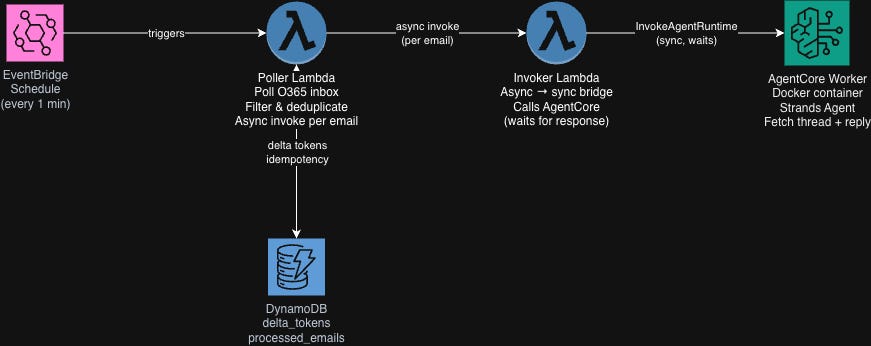
EventBridge fires the Poller Lambda on a schedule, every 1 minute in production.
The Poller Lambda authenticates to Microsoft Graph API, fetches new emails using a delta query, filters out anything that shouldn’t trigger a response (emails from the bot itself, already-read messages), checks DynamoDB to skip anything already processed, marks new emails as processed, then async-invokes the Invoker Lambda for each one.
The Invoker Lambda is a thin bridge. It receives the email payload from the Poller and calls the AgentCore runtime with it. Similar to the AgentCore Slack Bot architecture, we need this extra Lambda layer because AgentCore invocations are synchronous calls that can run for a long time. The Poller needs to finish quickly and return control to EventBridge. Having the Invoker absorb the blocking call means the Poller stays fast and lightweight regardless of how long the agent takes to respond.
The AgentCore Worker is a containerized Python application using the Strands agent framework. It fetches the full email thread for context, runs the agent with all its tools, converts the response to email-safe HTML, and sends a reply via Graph API.
The AgentCore side (Bedrock model, Strands agent setup, MCP tool integrations, memory) is the same pattern as the Slack bot. If you want the deep dive on that, check out the AgentCore Slack Bot series. This article focuses on what’s unique to email.
Setting Up Microsoft 365 Access
Before we write any code, we need to give AWS permission to read and send email from an O365 shared mailbox. This requires an Azure AD app registration.
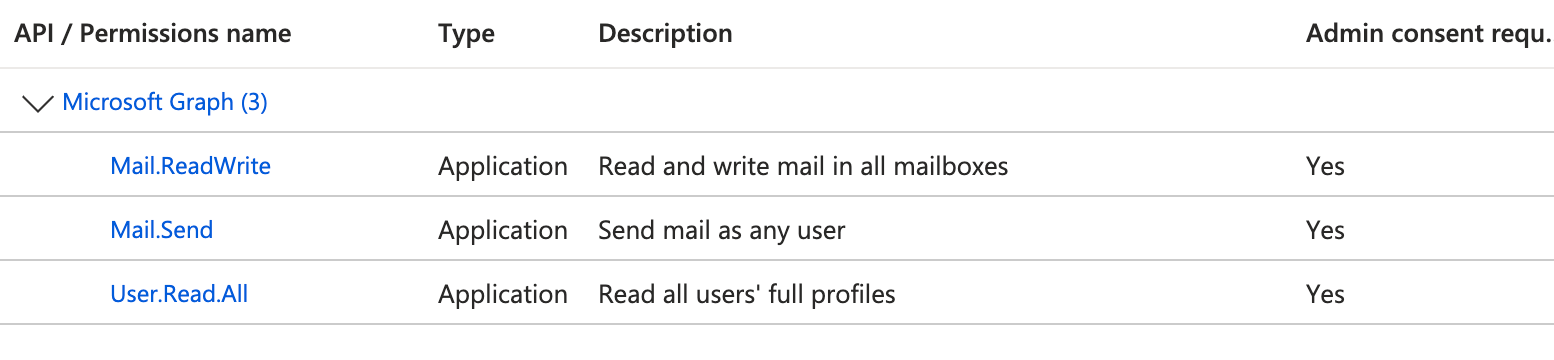
In the Azure Portal, create a new app registration and grant it Application permissions (not Delegated, since this runs as a background service with no user sign-in). Grant admin consent. Create a client secret. Record the tenant ID, client ID, and client secret. These go into AWS Secrets Manager.
One important security step: restrict the app to only access the specific shared mailbox, not every mailbox in your tenant. You do this via an Exchange Application Access Policy in PowerShell:
Connect-ExchangeOnline
New-DistributionGroup -Name "EmailBot-AllowedMailboxes" -Type Security
Add-DistributionGroupMember -Identity "EmailBot-AllowedMailboxes" -Member "bot@yourdomain.com"
New-ApplicationAccessPolicy `
    -AppId "{AZURE_CLIENT_ID}" `
    -PolicyScopeGroupId "EmailBot-AllowedMailboxes" `
    -AccessRight RestrictAccess `
    -Description "Restrict EmailBot to specific mailboxes"
Without this, your app registration has access to read every mailbox in the tenant.
One nice aspect of this approach is that if the distribution group is ever accidentally emptied or deleted, the policy fails shut. The app loses access to everything rather than gaining access to everything.
Authenticating to Graph API
With credentials in place, the Poller Lambda authenticates using the OAuth 2.0 client credentials flow. No user interaction, just the app’s own credentials.
def get_graph_token() -> str:
    """Get OAuth2 token for Microsoft Graph API with caching"""
    # Check container-level cache first (with 10-minute buffer before expiry)
    cache_key = "graph_token"
    if cache_key in _token_cache:
        token, expires_at = _token_cache[cache_key]
        if time.time() < expires_at - 600:
            return token

    response = requests.post(
        f"https://login.microsoftonline.com/{tenant_id}/oauth2/v2.0/token",
        data={
            "grant_type": "client_credentials",
            "client_id": client_id,
            "client_secret": client_secret,
            "scope": "https://graph.microsoft.com/.default",
        },
        timeout=30,
    )
    response.raise_for_status()

    data = response.json()
    token = data["access_token"]
    expires_in = data.get("expires_in", 3600)
    _token_cache[cache_key] = (token, time.time() + expires_in)
    return token
Azure AD client credentials tokens are valid for 60-90 minutes, and the response includes expires_in so we use that directly rather than hardcoding. We cache at the Lambda container level with a 10-minute safety buffer. If the container is warm, the next invocation reuses the cached token without another round-trip to Azure AD.
The Delta Query: Efficient Incremental Polling
This is the part that makes email polling actually work.
Graph API supports a concept called delta queries, a mechanism for efficient incremental sync. On the first call, you get all current messages and a delta token. On every subsequent call, you pass that token back and Graph API returns only what’s changed since your last sync. New emails only. Zero re-processing of old messages.
We store the delta token in DynamoDB between Lambda invocations.
def fetch_emails_delta(token, mailbox, delta_link):
    """
    Fetch new emails using Graph API delta query.
    On first run (no delta_link), fetches recent inbox messages and returns a token.
    On subsequent runs, returns only changes since the last token.
    """
    if delta_link:
        url = delta_link  # Use stored token to get only new changes
    else:
        url = (
            f"{GRAPH_API_BASE}/users/{mailbox}/mailFolders/inbox/messages/delta"
            "?$select=id,subject,bodyPreview,body,from,toRecipients,ccRecipients,"
            "receivedDateTime,conversationId,isRead,hasAttachments,internetMessageId"
            "&$top=50"
        )

    all_emails = []
    new_delta_link = None

    while url:
        response = requests.get(url, headers=headers, timeout=60)

        # Handle expired delta token
        if response.status_code == 410:
            error_data = response.json()
            if "syncStateNotFound" in str(error_data):
                raise DeltaTokenExpiredError("Delta token expired")

        response.raise_for_status()
        data = response.json()
        all_emails.extend(data.get("value", []))

        url = data.get("@odata.nextLink")  # Follow pagination if needed
        if "@odata.deltaLink" in data:
            new_delta_link = data["@odata.deltaLink"]  # Save new token

    return all_emails, new_delta_link
Delta tokens don’t last forever. For mail, Graph API manages tokens in an internal cache and evicts older ones as new ones are added. When your token is evicted, the next request returns a 410 Gone with syncStateNotFound. When that happens, we recover gracefully: clear the expired token, perform a fresh sync limited to the last 24 hours (to avoid reprocessing old email), and continue normally.
try:
    emails, new_delta_link = fetch_emails_delta(graph_token, mailbox, delta_link)
except DeltaTokenExpiredError:
    print("🟡 Recovering from expired delta token")
    clear_delta_token(mailbox)
    emails, new_delta_link = fetch_emails_initial_sync(graph_token, mailbox)
The 24-hour window on recovery is intentional. Without it, a token expiry could cause the bot to reprocess weeks of old email.
Idempotency: Don’t Reply Twice
Delta queries give us efficiency. Idempotency gives us correctness.
Even with delta tokens, there are failure modes where the same email could be processed twice: Lambda retries, timing edge cases, token expiry recovery overlapping with recent messages. So we track processed emails in a second DynamoDB table, keyed on internetMessageId.
The internetMessageId is the stable SMTP message ID. We use this instead of Graph API’s own id field because the Graph API ID can change if a message is moved between folders. The internetMessageId doesn’t change.
Critically, we mark the email as processed before invoking AgentCore, not after:
for email in actionable_emails:
    internet_msg_id = email.get("internetMessageId")

    if is_already_processed(internet_msg_id):
        print(f"🚮 Skipping already processed: {internet_msg_id}")
        continue

    # Mark BEFORE invoking - prevents duplicates if invocation fails
    mark_as_processed(internet_msg_id)
    invoke_invoker(email, mailbox)
If we marked after invocation and the invoke call failed, the next poll cycle would see the email as unprocessed and try again. Marking before means a failed invocation results in a missed email rather than a duplicate reply. For a pure Q&A bot that tradeoff might look different, but ours can create Jira tickets, send reply-all emails, and trigger external workflows. So in our case, a duplicate is harder to recover from than a missed message.
Records in the processed emails table have a 7-day TTL. Enough time to cover any retry window, short enough to not grow unbounded.
Filtering: What Gets a Reply
Not every email that lands in the inbox should trigger the bot. We filter out:
Emails sent by the bot itself: replies from the bot land back in the shared mailbox. Skipping these prevents infinite loops.
Already-read emails: on first sync (no delta token), the inbox may have old messages that are already read. We skip these so the bot doesn’t reply to ancient emails on first startup.
Deleted/removed items: Graph API delta responses include
@removedentries for deleted messages. We skip these.
And here’s an accidental win we discovered: we share the mailbox address with an Atlassian service account used by another internal tool. That means Jira comment notification emails land in the bot’s inbox too. Since the bot has the Atlassian MCP, it picks them up and responds directly in Jira. We essentially extended our bot fleet to Jira for the infrastructure cost of a user account. When the Jira replies first started showing up, we spent a few hours completely stumped, convinced there was some kind of ghost in the machine, before we finally connected the dots. Happy accident.
def filter_emails(emails, mailbox):
    filtered = []
    for email in emails:
        if "@removed" in email:
            continue
        sender = email.get("from", {}).get("emailAddress", {}).get("address", "")
        if sender.lower() == mailbox.lower():
            print(f"🚮 Skipping email from self: {email.get('id')}")
            continue
        if email.get("isRead", False):
            print(f"🚮 Skipping already read email: {email.get('id')}")
            continue
        filtered.append(email)
    return filtered
Handing Off to AgentCore
Once we have a filtered, deduplicated set of new emails, each one gets an async Lambda invocation to the Invoker:
client.invoke(
    FunctionName=INVOKER_FUNCTION_NAME,
    InvocationType="Event",  # Async - Poller doesn't wait for completion
    Payload=json.dumps(payload).encode("utf-8"),
)
The Invoker is intentionally thin. It receives the email payload and forwards it to the AgentCore runtime:
response = client.invoke_agent_runtime(
    agentRuntimeArn=agent_runtime_arn,
    runtimeSessionId=session_id,
    payload=json.dumps(event).encode("utf-8"),
)
The session ID is derived from the email ID, giving each email its own isolated AgentCore session. The AgentCore worker takes it from there: fetching thread context, running the Strands agent, and sending the reply. That’s Part 2.
Lessons Learned
Delta tokens expire, handle it explicitly. The 410/syncStateNotFound case is not documented prominently but it will happen. Graph evicts older mail delta tokens from its internal cache as new ones are added. If you don’t handle it, your bot stops working silently.
Use
internetMessageId, not Graph API’sid. The Graph API message ID changes when messages are moved between folders. The SMTP message ID doesn’t.Mark as processed before invoking, not after. A duplicate reply is far harder to recover from than a missed email.
Shared mailboxes work fine with Graph API. There was some initial skepticism about this internally. They behave identically to regular mailboxes via the API. The user account behind them just happens to be disabled.
Test locally with real message IDs early. We burned hours cycling through deploy, test, read-logs iterations before scripting a local test harness against real Graph API credentials. If you’re building this, invest in local testing up front.
Summary
Email bots can use push notifications, but the operational overhead makes polling the simpler choice for most teams. The core pieces here are an EventBridge-scheduled Poller Lambda that uses Graph API delta queries for efficient incremental sync, DynamoDB for delta token persistence and email deduplication, and an async hand-off to AgentCore for the actual agentic response. The patterns for idempotency, filtering, and token expiry recovery are straightforward once you’ve hit each failure mode once.
In Part 2, we’ll dig into what happens inside the AgentCore worker: building conversation context from an email thread, converting the agent’s markdown response to email-safe HTML that actually renders correctly in Outlook, and the surprisingly tricky problem of reply-all with internal domain filtering.
The code for this entire project is open source: GitHub Link.
Feel free to poke around, steal ideas, or open issues when things don’t make sense.
Good luck out there!
Alex