

This blog series focuses on presenting complex DevOps projects as simple and approachable via plain language and lots of pictures. If you find these useful, please consider subscribing - it’s what keeps these articles coming. <3
Hey all! Alex here again. In Part 1 we covered the polling architecture: EventBridge, delta queries, idempotency, and handing off to AgentCore. That got us to the point where the AgentCore worker receives an email payload and needs to do something useful with it.
This article covers what happens next. The worker needs to understand the full conversation, not just the latest message. It needs to run the agent. And it needs to send a reply that actually looks good in Outlook, Gmail, and Apple Mail. Each of those is its own rabbit hole.
This is Part 2 of a 2-part series:
Part 1: Full architecture and Microsoft 365 integration
Part 2 (this article): Building the email thread, sending formatted replies, and operating in production
The Problem: Email Is a Conversation, Not a Message
Email threads are different in character from chat threads. They span days or weeks. People forward chains with history already in them. By the time the bot receives an email, someone may have already forwarded a vendor contract with three replies on it, or CC’d the bot into an ongoing discussion.
If the agent only sees the latest email, it gives answers that are technically responsive but miss the point. We needed to give it the full thread.
And then there’s the reply. The agent runs, produces a response, and you need to send it. Which sounds straightforward until you realize email clients are wildly inconsistent about HTML support. Inline styles are the safest bet for cross-client compatibility. Outlook for Windows doesn’t support external stylesheets, and Gmail strips them entirely. Apple Mail is more forgiving but you can’t design for Apple Mail and ignore everyone else.
We solved both. Here’s how.
Fetching the Thread
The worker receives an email payload from the Poller. That payload includes a conversationId, which is Graph API’s identifier for an email thread. We use that to fetch the full thread before doing anything else.
Simple enough, except Graph API has a quirk here. You’d expect to filter server-side using something like $filter=conversationId eq 'abc123'. In practice we found this unreliable. The call returns http/400 errors in certain query contexts and the error messages aren’t helpful when it does fail.
The workaround is to fetch the last 50 messages from the inbox and filter client-side:
# Fetch recent messages and filter client-side
# Server-side conversationId filtering returns 400 errors
url = f"{GRAPH_API_BASE}/users/{mailbox}/messages"
params = {
    "$select": "id,subject,body,from,toRecipients,receivedDateTime,hasAttachments,conversationId",
    "$orderby": "receivedDateTime desc",
    "$top": 50,
}

response = requests.get(url, headers=headers, params=params, timeout=60)
data = response.json()
all_emails = data.get("value", [])

# Client-side filter by conversationId
emails = [email for email in all_emails if email.get("conversationId") == conversation_id]

# Sort ascending so oldest is first (natural conversation order)
emails.sort(key=lambda x: x.get("receivedDateTime", ""))
Fetching 50 and filtering locally isn’t elegant, but it works reliably. For a bot mailbox that handles focused internal traffic, threads are almost always within the last 50 messages. We cap thread context at 20 emails to keep very long threads from blowing up the context window.
The HTML Problem
The agent produces a markdown response. That’s by design.
We tried having the bot produce HTML directly. The output was a mess: partial tags, inconsistent styling, sometimes valid HTML and sometimes not. We tried guiding it with system prompt instructions. Still inconsistent.
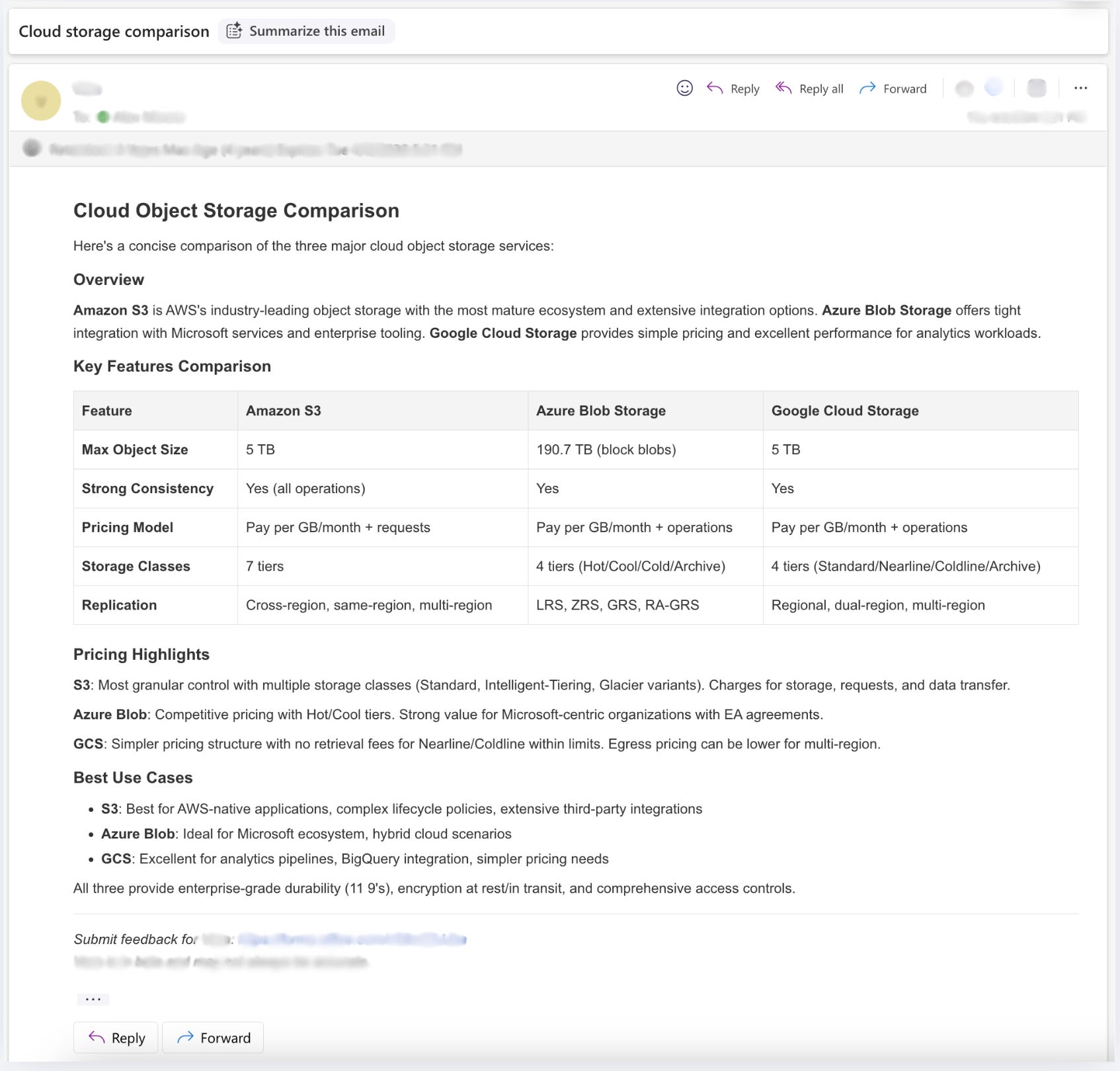
The solution was to separate the concerns entirely. Since bots are excellent at markdown, the bot returns a clean response every time. Then we use code to convert it to HTML.
We wrote a custom renderer for mistune, a Python markdown parser, that produces email-safe HTML with inline styles on every element.
Here’s a slice of EmailSafeRenderer to give you a sense of the pattern:
class EmailSafeRenderer(HTMLRenderer):

    def heading(self, text, level, **attrs):
        if level == 1:
            style = "font-size: 24px; font-weight: bold; margin: 1em 0 0.5em 0; color: #333333;"
        elif level == 2:
            style = "font-size: 20px; font-weight: bold; margin: 0.8em 0 0.4em 0; color: #333333;"
        else:
            style = "font-size: 16px; font-weight: bold; margin: 0.6em 0 0.3em 0; color: #333333;"
        return f'<h{level} style="{style}">{text}</h{level}>\n'

    def block_code(self, code, info=None):
        code = html.escape(code)
        style = (
            "background-color: #f4f4f4; "
            "border-left: 3px solid #ddd; "
            "padding: 1em; "
            "margin: 0.5em 0; "
            "font-family: 'Courier New', Courier, monospace; "
            "font-size: 13px; "
            "overflow-x: auto; "
            "white-space: pre;"
        )
        return f'<pre style="{style}"><code>{code}</code></pre>\n'

    def table(self, text):
        style = "border-collapse: collapse; margin: 0.5em 0; width: 100%;"
        return f'<table style="{style}">\n{text}</table>\n'

    def table_cell(self, text, align=None, head=False, **attrs):
        tag = "th" if head else "td"
        style = "border: 1px solid #ddd; padding: 8px; text-align: left;"
        if head:
            style += " background-color: #f4f4f4; font-weight: bold;"
        return f'<{tag} style="{style}">{text}</{tag}>'
Every element gets explicit inline styles. Tables, code blocks, blockquotes, links, all of it. The full renderer is in the gist below. Note this is a simplified excerpt showing the main patterns — the full implementation handles additional heading levels and a few more element types.
GIST: worker_email_graph.py — EmailSafeRenderer and send_email_reply
The rendered HTML is wrapped in a minimal <html><body> document with base font styles, and the original email is quoted at the bottom in gray text. The standard email reply format that Outlook and Gmail users expect.
Reply-All with Domain Filtering
Sending the reply sounds like a one-liner, but it’s not.
Normally you’d just use reply-all so CC’d colleagues stay in the thread. The problem is the bot lives in a shared mailbox and people regularly CC external vendors or personal addresses. You don’t want the bot sending internal responses to people outside the org.
Graph API has a replyAll endpoint, but it doesn’t let you touch the recipient list. It sends to whoever it sends to, no filtering possible.
The real solution is a three-step flow: create a reply-all draft, PATCH it with a filtered recipient list, then send it.
# Step 1: Create draft (captures correct reply-all recipients)
create_url = f"{GRAPH_API_BASE}/users/{mailbox}/messages/{message_id}/createReplyAll"
create_response = requests.post(create_url, headers=headers, json={}, timeout=60)
draft = create_response.json()
draft_id = draft["id"]

# Step 2: Filter recipients to internal domains only
to_recipients, cc_recipients = build_reply_recipients(
    draft_to=draft.get("toRecipients", []),
    draft_cc=draft.get("ccRecipients", []),
    allowed_domains=internal_email_domains,
    sender_address=original_email.get("from", {}).get("emailAddress", {}).get("address", ""),
    sender_entry=original_email.get("from", {}).get("emailAddress"),
    mailbox=mailbox,
)

# Step 3: PATCH the draft with filtered recipients and HTML body
patch_payload = {
    "toRecipients": to_recipients,
    "ccRecipients": cc_recipients,
    "body": {"contentType": "HTML", "content": html_body},
}
requests.patch(patch_url, headers=headers, json=patch_payload, timeout=60)

# Step 4: Send
requests.post(send_url, headers=headers, timeout=60)
The first layer of filtering happens at the Poller: the ALLOWED_SENDER_DOMAINS env var drops emails from external domains before they ever reach the worker. If the sender isn’t on the list, the email is silently discarded and nothing else runs.
For emails that do reach the worker, build_reply_recipients filters the To and CC lists against the same allowed domains before sending. The original sender is always preserved in the To list. By this point they’ve already cleared the Poller check, so keeping them is the right call.
If the PATCH or send step fails, we clean up the draft so it doesn’t clutter the mailbox:
except Exception:
    try:
        requests.delete(delete_url, headers=headers, timeout=30)
        logger.info(f"🟡 Cleaned up draft {draft_id} after send failure")
    except Exception:
        pass
    raise
The full flow (thread fetch, conversation build, agent execution, reply send) is in worker_conversation.py:
GIST: worker_conversation.py — handle_email_event and build_conversation_context
File and Chart Attachments
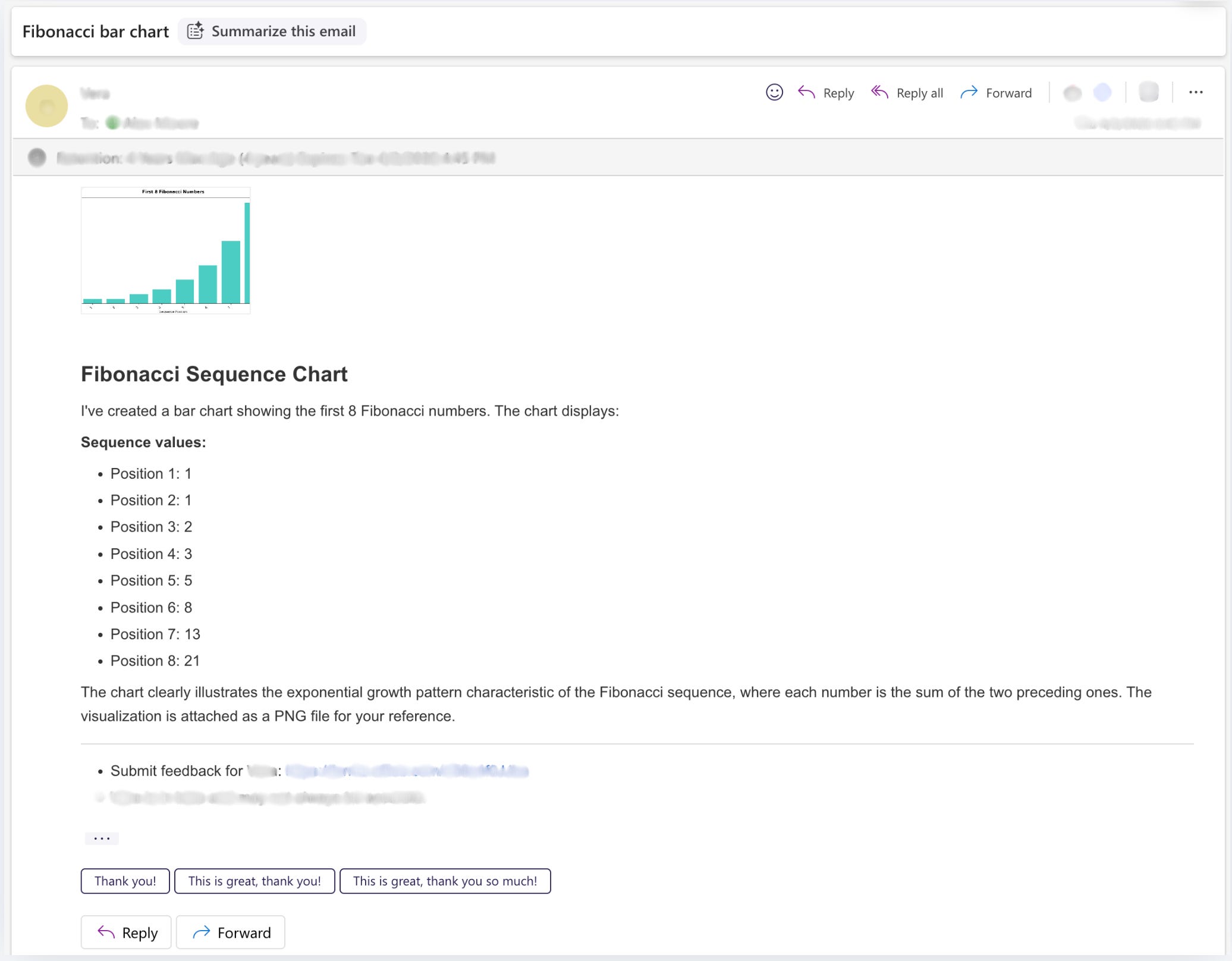
The bot can also send attachments in its replies. The agent has access to create_file_attachment and create_chart tools. When the agent decides to include a CSV, a script, or a chart, those come back as attachment objects alongside the response text.
Attaching files via Graph API works differently than you might expect. You can’t include attachments in the PATCH payload. They have to be POSTed individually to the draft’s attachments endpoint after the body PATCH:
for att in graph_attachments:
    att_url = f"{GRAPH_API_BASE}/users/{mailbox}/messages/{draft_id}/attachments"
    requests.post(att_url, headers=headers, json=att, timeout=60)
Each attachment is base64-encoded with a content type and filename. Graph API’s inline attachment limit is under 3 MB. We warn at 2.5 MB encoded as a conservative buffer. For larger files you’d need to use the upload session API, which we haven’t implemented yet.
Deploying and Operating the Email Bot
The worker container deploys on the same AgentCore stack Kyler covered in her deployment article: Docker image in ECR, AgentCore runtime resource in Terraform, an Invoker Lambda to bridge async to synchronous. If you’ve read that article, the infrastructure will look familiar.
What’s different on the email side:
We use EventBridge, instead of a webhook, and it’s schedule rule fires every minute and triggers the Poller Lambda. That’s the entire inbound mechanism.
Restrict mailbox access with an Application Access Policy. The Azure app registration uses Application permissions, which means it implicitly has access to every mailbox in the tenant. You should lock that down before going to production. See Part 1 for the PowerShell snippet.
Wire up error replies. In the Slack bot, errors post back to the Slack thread. Here, errors need to go back via email. The worker wraps every invocation in a try/except and calls send_email_reply() with a formatted error message if something goes wrong. The alternative is silence, which is a much worse user experience when someone is waiting on an email response.
Set ALLOWED_SENDER_DOMAINS. The Poller Lambda accepts a comma-separated list of allowed sender domains. When set, emails from domains not on the list are silently dropped before reaching the worker. Leave it empty and all senders get through.
Docker Build Time
One thing we added while building this bot that made iteration a lot faster: ECR layer caching. The two changes added together dropped build times from ~21 minutes to ~3-4 minutes!
First, Dockerfile layer ordering. The COPY src/*.py step was moved to the very end, after pip install. This means code-only changes hit the Docker layer cache at the COPY step and skip the entire dependency install.
Second, ECR registry caching. The null_resource build command pushes a :buildcache tag to ECR and pulls from it on the next build:
triggers = {
  dockerfile_hash   = filesha256("${path.module}/Dockerfile")
  requirements_hash = filesha256("${path.module}/requirements.txt")
  src_files_hash    = sha256(join("", [for f in fileset("${path.module}/src", "**/*.py") : filesha256("${path.module}/src/${f}")]))
}
docker buildx build \
--platform linux/arm64 \
--cache-from=type=registry,ref=${var.ecr_repository_url}:buildcache \
--cache-to=type=registry,ref=${var.ecr_repository_url}:buildcache,mode=max \
--output=type=registry,compression=gzip,force-compression=true \
-t ${var.ecr_repository_url}:${local.content_hash} \
-t ${var.ecr_repository_url}:latest \
--push .The layer cache lives in ECR so it’s available from any machine. CI runners, new laptops, whatever. For a bot you’re iterating on, going from 21 minutes to under 4 is a meaningful difference.
Also note the dual tagging: :content_hash and :latest. The AgentCore runtime references the content-hash tag, so it only updates when code actually changes. Infrastructure-only applies, like env var updates, IAM policy tweaks, and EventBridge schedule changes, skip the Docker build entirely.
Lessons Learned
Don’t ask the bot to write HTML. It won’t. Not reliably. Have it return markdown and convert programmatically. The separation of concerns is the right call.
Server-side
conversationIdfiltering doesn’t work. Fetch recent messages and filter client-side. It’s not pretty but it’s reliable.The create-PATCH-send flow is the right way to do reply-all with recipient control. The simple
replyAllendpoint exists but gives you no control over who gets the reply.Handle external senders at the Poller, not in reply logic. Use
ALLOWED_SENDER_DOMAINSto drop external emails before they reach the worker. The worker always preserves the original sender in reply recipients. That’s correct behavior, but it assumes the Poller has already made the decision about who should get a reply at all.Clean up drafts on failure. If you create a draft and the send fails, delete the draft. Otherwise they pile up in the mailbox.
Two Azure app registrations, not one. One for mailbox access (
Mail.Read,Mail.ReadWrite,Mail.Send), one for the Azure MCP integration. Same tenant, different credentials. Least privilege matters here.Wire up error replies on day one. Email is async. Silence after a failed invocation is a bad user experience. The error reply path should be in place before you go live.
Order your Dockerfile layers by change frequency. Put
COPY src/last. Combined with ECR registry caching, this takes builds from 21 minutes to under 4.
Summary
The AgentCore worker builds full conversation context from the email thread, maps each message to the correct role, and runs the Strands agent. The response comes back as markdown, gets converted to email-safe inline-styled HTML by a custom mistune renderer, and goes out via a create-draft-PATCH-send flow that filters recipients to internal domains only.
The deployment is the same AgentCore stack Kyler covered in her series, with email-specific additions: an EventBridge schedule instead of a webhook, an Exchange Online Application Access Policy to scope mailbox access, an error reply path so failures are visible to users, and a Docker build optimized with ECR layer caching and proper layer ordering that cuts build times from ~21 minutes to under 4.
The full project is open source at github.com/alexjmoore8/AgenticEmailBot.
Good luck out there.
Alex Moore