

This blog series focuses on presenting complex DevOps projects as simple and approachable via plain language and lots of pictures. You can do it!
These articles are supported by readers, please consider subscribing to support me writing more of these articles <3 :)
Hey all!
In the last article, we talked about why I migrated from Lambda to AWS Bedrock AgentCore, the architecture with two Lambdas feeding into an AgentCore runtime, and the features you get out of the box.
This article is part of a series:
Part 2 (this article) - AgentCore MCP Gateway
Part 3 - AgentCore Memory and Tools
Part 4 - AgentCore Deployment, Operations, and Lessons Learned
Now let’s talk about tools.
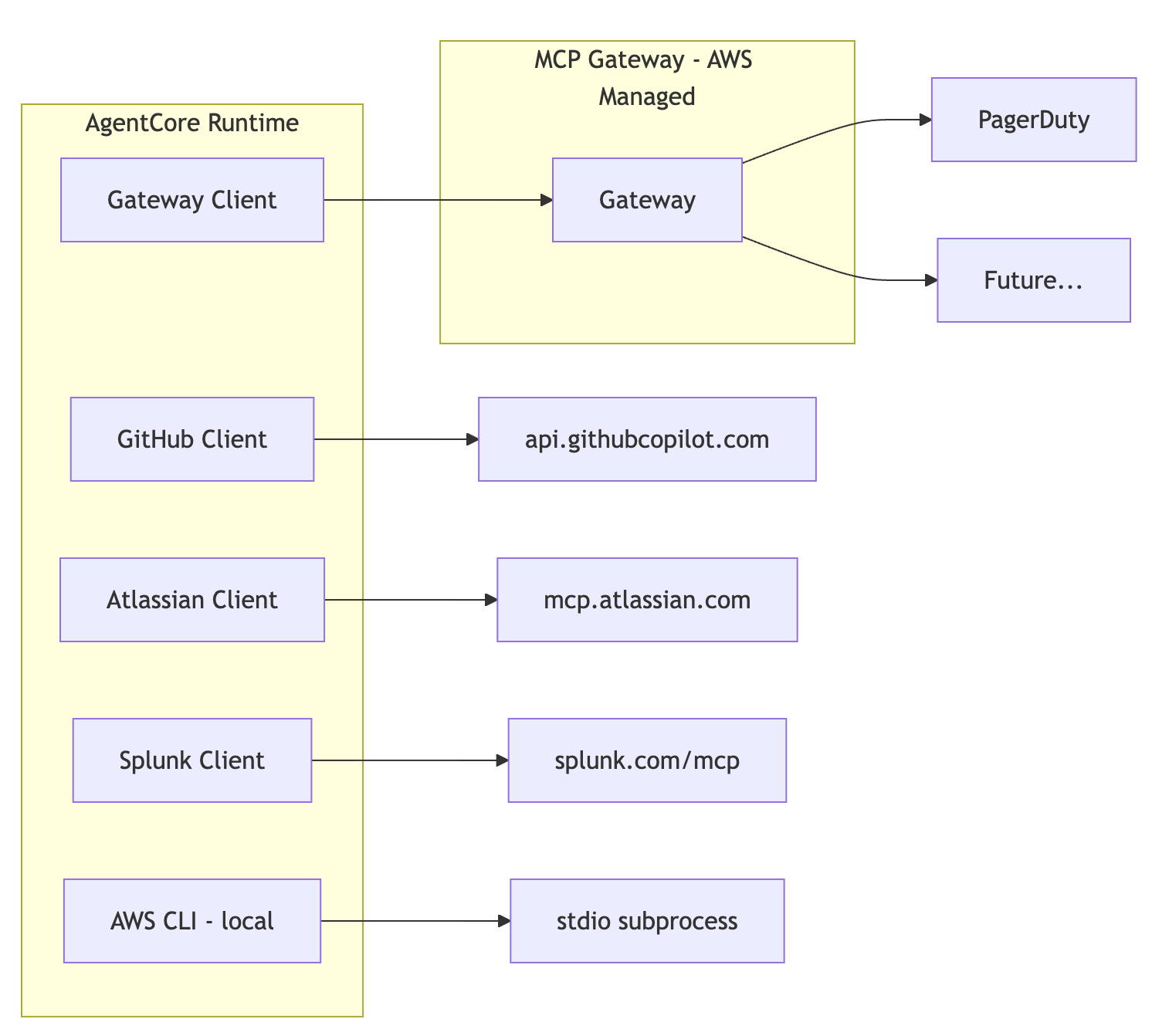
Vera (our Slack bot) currently has access to tools from PagerDuty, GitHub, Atlassian (Jira + Confluence), Azure, AWS CLI, and Splunk. That’s a lot of tool providers, and each one has its own authentication mechanism, transport protocol, and quirks. Managing all of that in application code can cause a lot of sprawl.
AgentCore’s MCP Gateway is designed to solve this - a single, managed endpoint for all your tool providers. But today, the gateway doesn’t support every auth pattern, so I’m running a hybrid: some tools go through the gateway, others connect directly. This article covers both patterns, how they coexist, and where this is all heading.
If you want a deeper look at MCP tool integration with the Strands SDK specifically, I covered that in a previous article. We’ll be lighter on that here and focus more on the gateway pattern.

Let’s get into it.
Local MCP Connections
Before the gateway existed, every tool provider was a direct MCP connection managed in application code. That’s still how most of Vera’s tools work today, and it’s worth understanding the pattern before we talk about what the gateway changes.
MCP (Model Context Protocol) supports multiple transport types. Vera uses three of them:
Stdio (local process)
The MCP server runs as a subprocess inside the container. AWS CLI MCP works this way—it’s a Python process that Vera spawns and communicates with over stdin/stdout.
# AWS CLI: local process, stdio transport
aws_cli_mcp_client = MCPClient(
  lambda: stdio_client(
    StdioServerParameters(
      command=f”{opt_aws_cli_mcp_dir}/.venv/bin/awslabs.aws-api-mcp-server”,
      env=env,
    )
  ),
  prefix=”aws”,
)
Streamable HTTP (remote)
The MCP server is hosted remotely and you connect over HTTP. GitHub and Splunk use this pattern, each with their own bearer token.
# GitHub: remote, streamable HTTP with bearer token
github_mcp_client = MCPClient(
lambda: streamablehttp_client(
“https://api.githubcopilot.com/mcp/”,
headers={”Authorization”: f”Bearer {github_token}”},
timeout=timedelta(seconds=30),
sse_read_timeout=timedelta(seconds=300),
    ),
tool_filters=tool_filters,
prefix=”github”,
)
SSE (remote, server-sent events)
An older transport pattern. Atlassian’s MCP endpoint still uses this. It has its own token refresh dance—exchange a refresh token for an access token before connecting.
# Atlassian: remote, SSE with refresh token flow
access_token = get_access_token(refresh_token, client_id)
atlassian_mcp_client = MCPClient(
lambda: sse_client(
“https://mcp.atlassian.com/v1/sse”,
headers={”Authorization”: f”Bearer {access_token}”},
timeout=300.0,
    ),
tool_filters=tool_filters,
prefix=”atlassian”,
)
This works. Each client connects independently, each manages its own auth, and they all feed tools into the same agent. But there are friction points:
Credential sprawl. Every provider needs its own secret stored, fetched, and refreshed. GitHub needs a PAT. Atlassian needs a client ID and refresh token. PagerDuty needs an API token. Splunk needs a bearer token. Azure needs a tenant ID, client ID, and client secret. That’s a lot of secrets to manage.
Per-provider auth code. Each provider has its own authentication pattern. Atlassian’s refresh token flow looks nothing like GitHub’s static PAT. Every new provider means writing another auth handler.
No centralized management. Want to see which tools your bot has access to? You need to read the code. Want to add a new provider? You need to write code, build a new container, and deploy. There’s no infrastructure-level view of “here are all the tools.”
The gateway changes this - for providers that support it.
AgentCore MCP Gateway Pattern
The AgentCore MCP Gateway is an AWS-managed service that sits between your agent and your tool providers. Instead of connecting directly to each provider, your agent connects to one gateway endpoint. The gateway handles routing, authentication, and tool discovery.
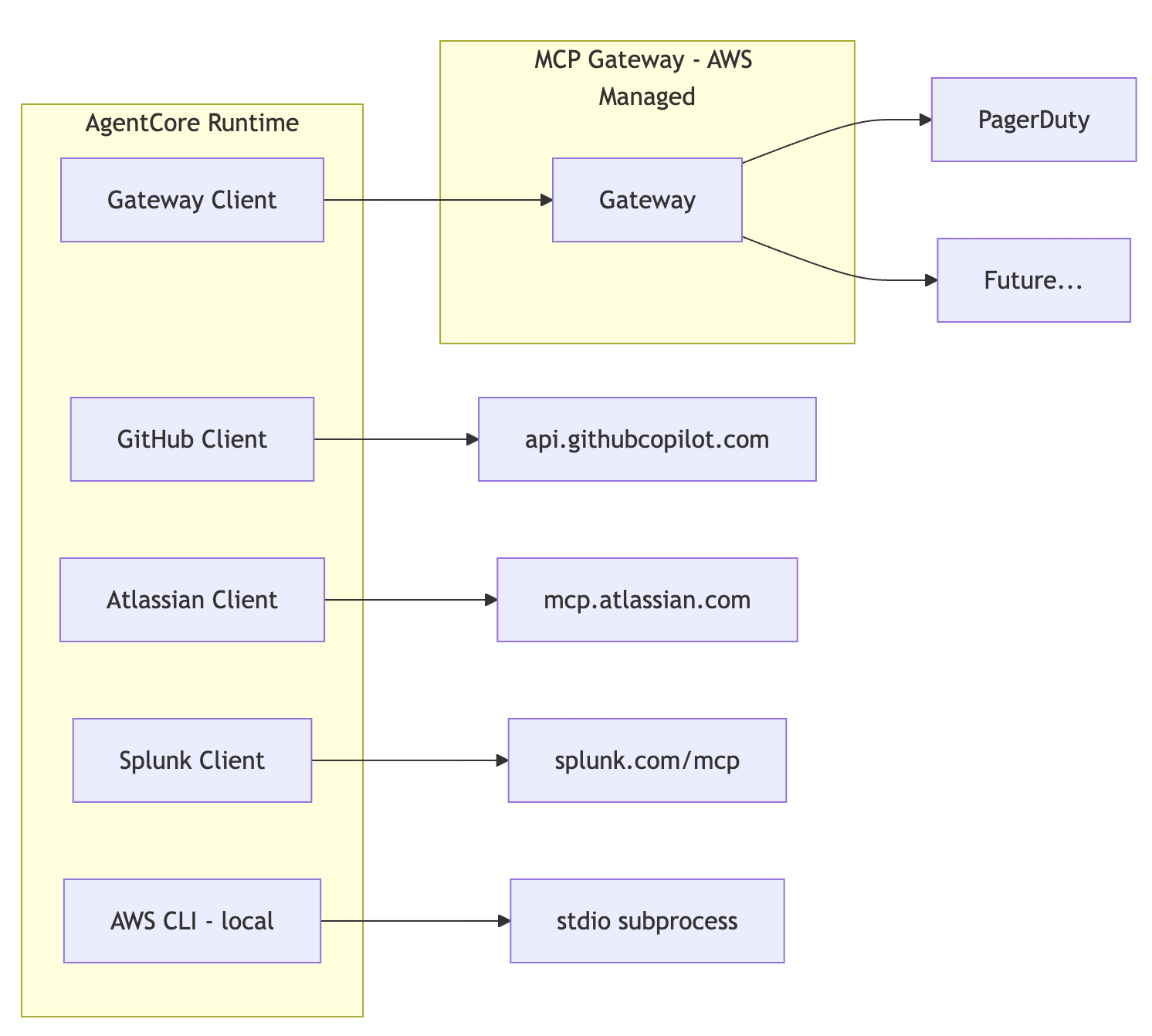
Tool registration moves from your application code to shared infrastructure. You define providers as gateway “targets” in Terraform. The gateway handles authentication to those providers using credentials stored in AgentCore’s Identity and token vault system. Your application code just connects to the gateway.
If authentication fails, the gateway can remove those tools without crashing your application. If you add tools, the gateway can provide those to any number of applications that use that gateway. This establishes a really scalable pattern for MCPs for your agents.
Here’s what that looks like in practice.
Setting Up Cognito for Gateway Auth
The gateway needs to authenticate your agent. It uses Cognito OAuth2 with the client credentials flow -machine-to-machine auth, no human login involved.
The setup has four pieces, all in Terraform:
1. A Cognito User Pool - the identity authority.
resource “aws_cognito_user_pool” “gateway” {
  name = “${var.gateway_name}-${var.environment}”
  password_policy {
    minimum_length    = 16
    require_uppercase = true
    require_lowercase = true
    require_numbers   = true
    require_symbols   = true
  }
}
2. Cognito Domain - provides the OAuth token endpoint.
resource “aws_cognito_user_pool_domain” “gateway” {
  domain       = lower(”${var.gateway_name}-${var.environment}”)
  user_pool_id = aws_cognito_user_pool.gateway.id
}
3. A Resource Server - defines the OAuth scope your agent needs.
resource “aws_cognito_resource_server” “gateway” {
  identifier   = var.gateway_name
  name         = var.gateway_name
  user_pool_id = aws_cognito_user_pool.gateway.id
  scope {
    scope_name        = “invoke”
    scope_description = “Scope for invoking the ${var.gateway_name} AgentCore gateway”
  }
}
4. An App Client - generates the credentials your agent uses.
resource “aws_cognito_user_pool_client” “gateway” {
name         = “${var.gateway_name}-client-${var.environment}”
  user_pool_id = aws_cognito_user_pool.gateway.id
  # OAuth 2.0 client credentials flow (machine-to-machine)
  generate_secret                      = true
  allowed_oauth_flows_user_pool_client = true
  allowed_oauth_flows                  = [”client_credentials”]
  allowed_oauth_scopes = [
    “${aws_cognito_resource_server.gateway.identifier}/invoke”
  ]
  refresh_token_validity        = 30
  enable_token_revocation       = true
  supported_identity_providers  = [”COGNITO”]
}
The Cognito client ID gets passed to the worker as an environment variable. The client secret goes into Secrets Manager and gets fetched at runtime. The token URL is constructed from the domain:
https://{domain}.auth.{region}.amazoncognito.com/oauth2/tokenAll of these outputs flow from the gateway module into the worker module:
# main.tf - wiring gateway outputs to worker
module “worker” {
  source = “./worker”
  # Gateway configurations
  gateway_arn       = module.gateway.gateway_arn
  gateway_client_id = module.gateway.cognito_client_id
  gateway_url       = module.gateway.gateway_url
  gateway_token_url = module.gateway.cognito_token_url
  gateway_scope     = module.gateway.gateway_scope
  # ... other config
}
The AgentCore Gateway Resource Itself
With Cognito in place, the gateway resource is straightforward:
resource “aws_bedrockagentcore_gateway” “main” {
  name        = var.gateway_name
  description = “Unified MCP gateway for ${var.runtime_name}”
  protocol_type = “MCP”
  protocol_configuration {
    mcp {
      supported_versions = [”2025-03-26”, “2025-06-18”, “2025-11-25”]
      search_type        = “SEMANTIC”
    }
  }
  # JWT authentication via Cognito
  authorizer_type = “CUSTOM_JWT”
  authorizer_configuration {
    custom_jwt_authorizer {
      discovery_url   = “https://cognito-idp.(region).amazonaws.com/${aws_cognito_user_pool.gateway.id}/.well-known/openid-configuration”
      allowed_clients = [aws_cognito_user_pool_client.gateway.id]
    }
  }
  role_arn        = aws_iam_role.gateway.arn
  exception_level = “DEBUG”
}
There’s a few things to note.
Semantic search
The gateway supports `SEMANTIC` search type, which enables on-demand tool discovery based on what the user is asking rather than loading every tool upfront. In our current architecture, we load all gateway tools at startup since there are only a handful registered. But as more providers migrate to the gateway, on-demand semantic discovery will make more sense than loading hundreds of tools into the agent’s context on every invocation.
MCP protocol versions
The gateway supports multiple MCP versions. This is important because the protocol is evolving and different clients may use different versions.
CUSTOM_JWT authorizer
The gateway validates tokens by fetching the OIDC discovery document from Cognito. No custom validation code needed.
The gateway also needs IAM permissions -access to Secrets Manager for provider credentials, S3 for OpenAPI schemas, and the token vault for outbound authentication:
# Gateway needs access to provider credentials in token vault
resource “aws_iam_role_policy” “gateway_workload_identity” {
  name = “WorkloadIdentityAccess”
  role = aws_iam_role.gateway.id
  policy = jsonencode({
    Version = “2012-10-17”
    Statement = [
      {
        Effect = “Allow”
        Action = [”bedrock-agentcore:GetWorkloadAccessToken”]
        Resource = [
          “arn:aws:bedrock-agentcore:(region):(account ID):workload-identity-directory/default”,
          “arn:aws:bedrock-agentcore:(region):(account ID):workload-identity-directory/default/workload-identity/*”
        ]
      },
      {
        Effect = “Allow”
        Action = [”bedrock-agentcore:GetResourceApiKey”]
        Resource = [
          “arn:aws:bedrock-agentcore:(region):(account ID):workload-identity-directory/default”,
          “arn:aws:bedrock-agentcore:(region):(account ID):workload-identity-directory/default/workload-identity/*”,
          “arn:aws:bedrock-agentcore:(region):(account ID):token-vault/default”,
          “arn:aws:bedrock-agentcore:(region):(account ID):token-vault/default/apikeycredentialprovider/*”
        ]
      }
    ]
  })
}
PagerDuty on the Gateway
You thought this would be intuitive? lol
Registering PagerDuty as a gateway target looks simple in Terraform:
resource “aws_bedrockagentcore_gateway_target” “pagerduty” {
  gateway_identifier = aws_bedrockagentcore_gateway.main.gateway_id
  name               = “pagerduty”
  target_configuration {
    mcp {
      open_api_schema {
        s3 {
          uri = “s3://amazonbedrockagentcore-built-sampleschemas455e0815-oj7jujcd8xiu/pagerduty-open-api.json”
        }
      }
    }
  }
  credential_provider_configuration {
    api_key {
      provider_arn        = “arn:aws:bedrock-agentcore:(region):(account ID):token-vault/default/apikeycredentialprovider/pagerduty-vera-read-only”
      credential_prefix   = “Token”
      credential_location = “HEADER”
    }
  }
}
The URI I only got by building it by hand in the console and then importing it ¯\_(ツ)_/¯
Looks clean. But there are two things worth calling out.
First, the `provider_arn` references a credential provider in AgentCore’s token vault. That credential provider - an “outbound authentication” item in AgentCore Identity - has to be created separately. I did this manually through the AWS console rather than Terraform, because the token vault stores actual API keys and I didn’t want those in Terraform state. I always keep secrets separate from Terraform when I can.
The workflow is:
Manually create an outbound authentication credential provider in AgentCore Identity
Store your PagerDuty API token in that credential provider
Reference the credential provider’s ARN in your Terraform gateway target configuration
Deploy the gateway and target with Terraform
This separation makes sense from a security perspective - infrastructure definition stays in code, secrets stay out of it. You’re wiring together three things: the gateway target, a credential provider in the token vault, and the actual API key stored in that provider.
And then it didn’t work. Sweet. Turns out that even though this is an Integration, which I would think implies this is a vetted and tested pattern from AWS, it isn’t built correctly. Most APIs that auth with a bearer token use a header key of “bearer”, but PagerDuty doesn’t - it uses “Token”.
You can totally fix this in the Gateway Target (yay!) but I didn’t expect the special integration with PagerDuty to be broken out of the box (lol, boo).
Overrode the header value with credential_prefix = “Token” to fix it. Until we did, every PagerDuty API call failed with 401.
For an Integration that’s supposed to be turnkey, having to dig into PagerDuty’s auth docs to figure out their non-standard header format was a surprise.
Token Caching Keeping the Gateway Fast
Once the gateway is set up, your agent needs to authenticate to it on every request. That means fetching a JWT from Cognito. You don’t want to hit Cognito on every single tool call, so we cache tokens in memory.
# Token cache with expiry tracking
_token_cache = {”token”: None, “expires_at”: 0}
# Refresh 5 minutes before expiry to prevent race conditions
TOKEN_REFRESH_BUFFER = 300
def get_gateway_token(secrets_json):
    current_time = time.time()
# Check if token is expired or near expiry
if current_time >= (_token_cache[”expires_at”] - TOKEN_REFRESH_BUFFER):
        client_id = os.environ.get(”GATEWAY_CLIENT_ID”)
        client_secret = secrets_json.get(”GATEWAY_CLIENT_SECRET”)
# Fetch new token from Cognito
        token_data = _fetch_new_token(client_id, client_secret)
# Update cache
        _token_cache[”token”] = token_data[”access_token”]
        _token_cache[”expires_at”] = current_time + int(
            token_data.get(”expires_in”, 3600)
        )
return _token_cache[”token”]
The 5-minute buffer (`TOKEN_REFRESH_BUFFER = 300`) is important. Without it, you’d have a window where the token is technically valid when you check but expires before the request completes. Cognito tokens typically last an hour, so refreshing at 55 minutes is plenty safe.
This caching is especially effective in AgentCore because the container stays alive between requests. In Lambda, the cache only survived if you hit a warm container. In AgentCore, the cache persists for the lifetime of the runtime -up to 8 hours. One Cognito call can serve dozens of agent invocations.
The token gets injected into the transport via a factory function:
def create_transport():
“”“Create streamable HTTP transport with fresh JWT token”“”
    token = get_gateway_token(secrets_json)
return streamablehttp_client(
        gateway_url,
headers={”Authorization”: f”Bearer {token}”},
timeout=timedelta(seconds=30),
sse_read_timeout=timedelta(seconds=300),
    )
gateway_mcp_client = MCPClient(
    create_transport,  # Factory called each time transport is needed
tool_filters=tool_filters,
)
The factory pattern means each new transport connection gets a fresh (or cached) token automatically. No manual token management in the agent logic.
Combine MCP Client Tools Together
Today, Vera uses both patterns simultaneously. The agent initialization in `execute_agent()` builds a single tool list from all sources:
def execute_agent(secrets_json, conversation, memory_config=None):
    tools = []
    opened_clients = {}
# Built-in tools (no MCP, bundled with Strands SDK)
from strands_tools import calculator, current_time, retrieve
    tools.extend([calculator, current_time, retrieve])
# Gateway MCP (PagerDuty today, more providers later)
try:
        gateway_mcp_client = build_gateway_mcp_client(secrets_json, mode=”read_only”)
        opened_clients[”Gateway”] = gateway_mcp_client
        tools.append(gateway_mcp_client)
except Exception as error:
print(f”Error setting up gateway MCP client: {str(error)}”)
# Direct MCP: GitHub
try:
        github_mcp_client = build_github_mcp_client(secrets_json[”GITHUB_TOKEN”], “read_only”)
        opened_clients[”GitHub”] = github_mcp_client
        tools.append(github_mcp_client)
except Exception as error:
print(f”Error setting up GitHub MCP client: {str(error)}”)
# All others MCPs also - Azure, AWS, etc.
# Build agent with ALL tools from ALL sources
    agent = Agent(
model=BedrockModel(model_id=model_id, ...),
system_prompt=system_prompt,
tools=tools,
    )
The agent doesn’t know or care whether a tool came from the gateway or a direct connection. It sees a flat list of tools and uses whatever’s relevant to the user’s question. Ask about PagerDuty incidents? The gateway-routed PagerDuty tools handle it. Ask about a GitHub PR? The direct GitHub MCP client handles it.
The try/except means that if Atlassian’s MCP server is having a bad day, the agent still has PagerDuty, GitHub, AWS, and Splunk. Graceful degradation means you lose one provider, not all of them.
Each MCP target’s configuration is in its own file so we can do tool filtering (Vera is read-only) and makes it easy to sort out targets and authentication.
The Future: When the Gateway Absorbs Everything
Right now, the AgentCore MCP Gateway supports “Integrations” -providers that AWS has specifically built support for. PagerDuty is one of these. The gateway knows how to authenticate to PagerDuty, how to parse its OpenAPI schema, and how to route tool calls.
But GitHub, Atlassian, Splunk, and Azure aren’t Integrations yet. They use bearer token authentication over streamable HTTP or SSE, and the gateway’s credential provider system doesn’t support generic bearer token auth for arbitrary MCP endpoints today. That’s why these providers still need direct connections.
When AWS adds broader bearer token support to gateway targets -and the architecture is clearly heading that direction -the picture changes dramatically:
Today (hybrid):
Agent → Gateway → PagerDuty (Integration)
Agent → Direct  → GitHub (bearer token, streamable HTTP)
Agent → Direct  → Atlassian (bearer token, SSE)
Agent → Direct  → Splunk (bearer token, streamable HTTP)
Agent → Direct  → AWS CLI (local stdio)
Future (consolidated):
Agent → Gateway → PagerDuty
Agent → Gateway → GitHub
Agent → Gateway → Atlassian (Jira + Confluence)
Agent → Gateway → Splunk
Agent → Direct  → AWS CLI (local stdio, will always be direct)
When this migration is fully done, we’ll have:
IAM-only auth - each agent runtime won’t have to manage MCP target authentication secrets at all
Infrastructure-level tool management. Adding a new provider means adding a Terraform resource - a new gateway target. No application code changes at all.
Centralized tool discovery. The gateway knows about all registered tools across all providers. With semantic search, the agent can find the right tool even if it doesn’t know the exact name.
What’s Next
This article covered how Vera connects to its tool providers -the three MCP transport patterns, the AgentCore gateway as a managed alternative, the Cognito auth setup, and the PagerDuty configuration gotchas. We’re running a hybrid today: gateway where AWS supports it, direct connections everywhere else.
In the next article, we’ll cover AgentCore Memory - how Vera remembers things across conversations. Not just conversation history, but actual persistent knowledge: user preferences, learned facts, and session summaries. It’s one of the features that makes the AgentCore model feel genuinely different from Lambda.
The code for this entire project is open source:
Feel free to poke around, steal ideas, or open issues when things don’t make sense.
Happy building!
kyler