

This blog series focuses on presenting complex DevOps projects as simple and approachable via plain language and lots of pictures. You can do it!
These articles are supported by readers, please consider subscribing to support me writing more of these articles <3 :)
Hey all!
In previous articles we built generative AI bots that integrate with a RAG knowledge base using the AWS Bedrock backend.
They’re awesome, but they’re not agentic.
"Agentic" describes the ability to act autonomously, make decisions, and achieve goals without constant human intervention, a concept central to agentic AI systems that can plan, execute tasks, and adapt to new information
Basically, agentic bots do 1 step, and then return that information. That generally works really well for chatbots - read this information, return a summary. One step is all you need!
However, if you want a bot to do a multi-step process, that’s when you’re looking at an “agentic workflow”. Something like “Read our PagerDuty, isolate any resources with issues, then go look at AWS and see if the resources have an error state you can recommend fixes for” is multiple step - talk to platformA, analyze the data, then use that data to talk to platformB and analyze the data from there.
Agentic agents can do it!
Strands has emerged as a language that permits building effective and comprehensive bots with little python. It comes out of AWS, but the team there has made sure to open-source it (Apache 2.0 license) and make sure it’s compatible with lots of back-ends like OpenAI/ChatGPT, Anthropic, OLlama, and others.
It support agentic workflows, MCP (tool use to talk to platforms), A2A protocol (to talk to other bots and coordinate work), and will likely be kept up to date with AWS services in AgentCore like Memory and other cool stuff shaking out of that project.
It feels like a great place to start.
Strands, find all the ec2 instances in us-east-1, and give me their IPs and AZs in a table.
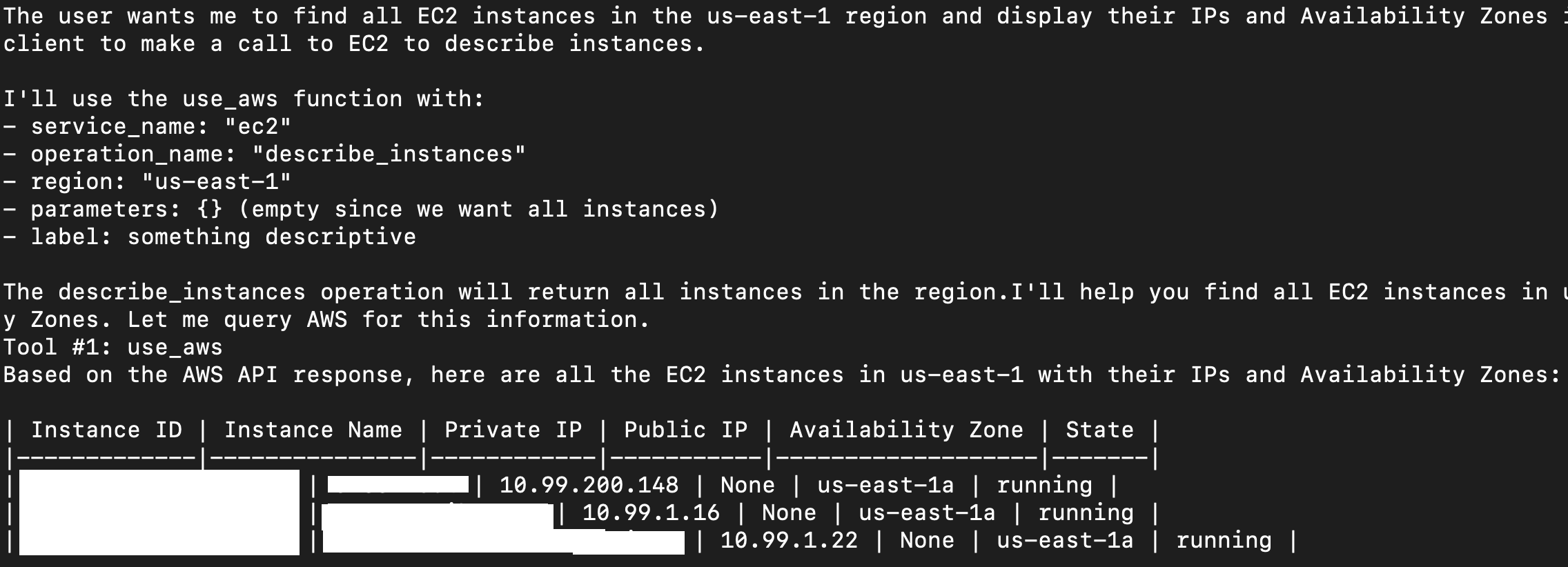
I’m going to be building some enterprise Strands agentic assistants over the next few months, but for now I’m just proving out really simple workflows, and I wanted to share them. They’re all here:
We’ll walk through one by one for how they work.
Simple Calculator
AI Models are terrible at math. They just are. If you ask a model a math problem that it’s seen before in its data set, it’ll give you the answer it saw. Is it the right answer? It doesn’t know.
I’m also bad at math, so I use a calculator. Best idea to make an AI good at math? Give it a calculator! And that’s one of the built-in tools available to strands.
On line 1, we import the Agent library from strands, and on line 2 we import from the strands_tools library, specifically the built-in tool called “calculator”.
Then on line 3 we instantiate an agent and provide it the tool.
Then on line 4 we ask the agent to calculate the square root of 125. The agent sees a problem that it can resolve with math, so it uses the calculator.
| from strands import Agent | |
| from strands_tools import calculator | |
| agent = Agent(tools=[calculator]) | |
| agent("What is the square root of 125") |
Here’s the output:

Simple Remote MCP - AWS Docs
Not all MCP servers require authentication - some provide tools you can use to do interesting stuff, like this remote MCP endpoint from AWS that lets you ask AWS itself about their documentation, and provide your bot the ability to read AWS documentation in its operation.
On lines 2-3, we import the MCPClient from the strands tools package, and on line 3 we import the standard i/o client and parameters.
On line 5, we define the aws_docs_client as a python lambda (small function), that’s calling the uvx tool to connect to the awslambda aws-documentation-mcp-server MCP. Notably, this doesn’t “run” the MCPClient yet, this just statically defines what will happen when it does.
On line 9, we define a “with”. This step actually runs the AWS Client config.
Then on line 10, we start the agent with the tools available from that MCP - note how we’re reading the tools list available from the remote MCP with list_tools_sync().
Then on line 11, we’re asking the agent a question.
| from strands import Agent | |
| from strands.tools.mcp import MCPClient | |
| from mcp import stdio_client, StdioServerParameters | |
| aws_docs_client = MCPClient( | |
| lambda: stdio_client(StdioServerParameters(command="uvx", args=["awslabs.aws-documentation-mcp-server@latest"])) | |
| ) | |
| with aws_docs_client: | |
| agent = Agent(tools=aws_docs_client.list_tools_sync()) | |
| response = agent("Tell me about Amazon Bedrock and how to use it with Python") |
Here’s how it looks, note how it reads documentation, then decides to read further documentation. This can build a comprehensive understanding of AWS technologies, it’s pretty cool.
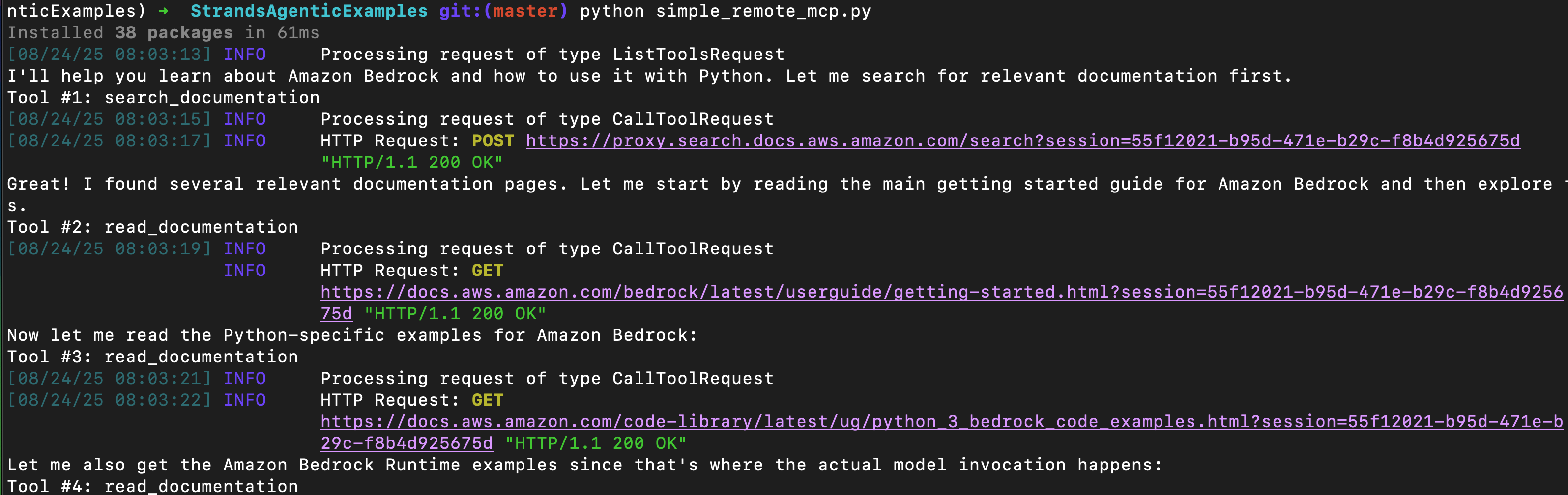
Simple GitHub Loop
While still simple, I added a few features to the single-MCP scripts. First, we use functions to define the MCPs.
You can see on line 6 that we define a function to build the streamable remote MCP client, just like the AWS documentation MCP.
| # Imports... | |
| # User question to start | |
| user_question = "Tell me about the Repos I own." | |
| # Build GitHub MCP | |
| def github_streamable_mcp_client(): | |
| token = os.getenv("GITHUB_TOKEN", "") | |
| if not token: | |
| raise RuntimeError("GITHUB_TOKEN is not set") | |
| return MCPClient(lambda: streamablehttp_client( | |
| "https://api.githubcopilot.com/mcp/", | |
| headers={"Authorization": f"Bearer {token}"} | |
| )) |
A bit lower down, we define the github MCP client, line 2.
And then on line 5, we connect to the MCP client on line 5 with the “with”.
On line 8, we establish the bedrock model, which customizes how the model works (number of tokens permitted, etc.), and build a list of tools we can pass to the agent, line 11-12.
Then on line 15 we build the agent and pass it the tools list.
| # Create MCP clients | |
| github_mcp_client = github_streamable_mcp_client() | |
| # Open tools and start chatting | |
| with github_mcp_client: | |
| # Configure bedrock model | |
| bedrock_model = configure_bedrock_model() | |
| # Inventory tools each MCP provides | |
| github_tools = github_mcp_client.list_tools_sync() | |
| agent_tools = [calculator, current_time, retrieve, use_aws] + github_tools | |
| # Create agent with tools | |
| agent = create_agent(agent_tools) |
Next, we start a “while” loop where we ask the agent our question that we defined above, to find all the Repos we own. The agent works agentically to get an answer, and then we hold on line 12, where the tool asks us if we want to continue.
We can type “exit” to break the loop and exit the script, or we can ask another question. Since the Agent is still instantiated, it remembers the previous question and information fetched from MCP, and can continue the conversation.
| with github_mcp_client: | |
| # ... | |
| # Begin conversation loop | |
| while True: | |
| print("User question:", user_question, end="\n\n") | |
| # Get response from agent | |
| response = agent(user_question) | |
| print("-" * 50) | |
| # Ask for follow-up question | |
| user_question = get_user_input("Question for model (or 'exit' to exit): ") | |
| if user_question.lower() == 'exit': | |
| break | |
| print("-" * 50) |
Here’s how it looks. I think it’s super cool that it can figure out who I am, and then read stuff.
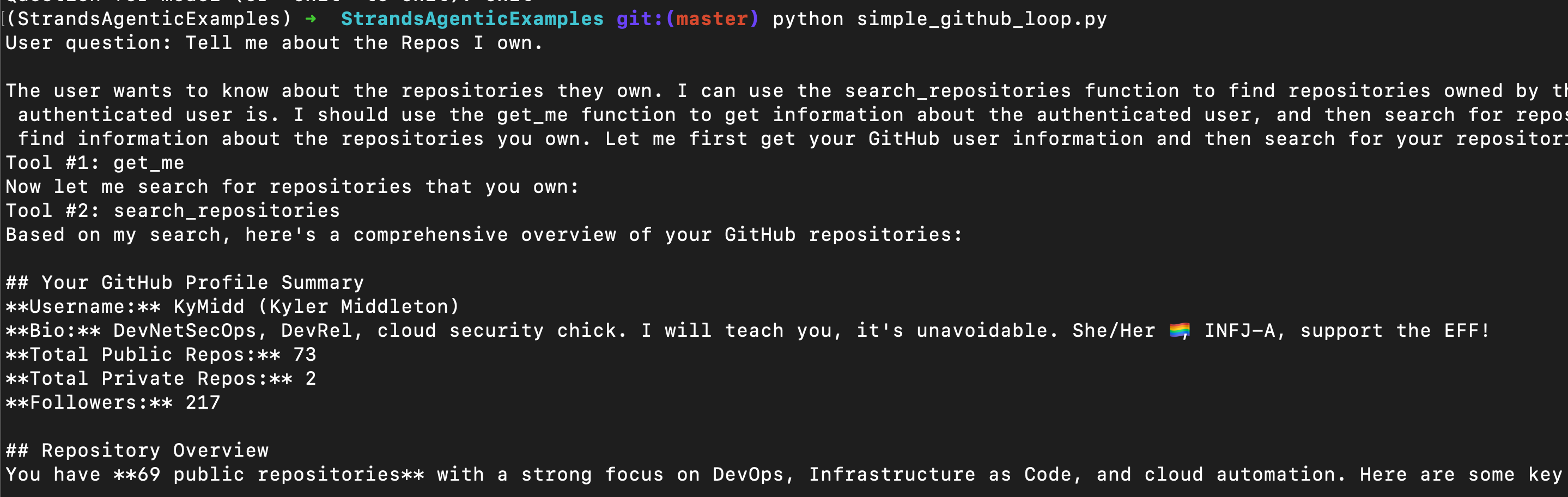
Simple PagerDuty - Local MCP
I’m a big fan of PagerDuty, and I see that they don’t yet have a remote hosted MCP for us to consume. However, they have published a local MCP that we can run ourselves. I staged that locally (and got uvx/uv installed), and then wrote this Strands script to use it.
On line 2 we establish our starter question, to find all active issues over the last 4 issues, and filter them.
Then on line 5 we define a function to utilize the local MCP server. Note that we’re not streaming anything from a remote destination, we’re literally providing the command flags that would start the MCP server if we ran them.
This script, when run, will basically call the MCP server as a child when we get to the “with” part of the function.
Note the “env” variables we inject into it on line 19-21. These are required to read PagerDuty.
see line 17, where we can enable writing to pagerduty, and with it commented out, the MCP will only execute “read” operations, which I feel is much safer with the state of AI today.
| # User question to start | |
| user_question = "Find all active issues over the last 4 hours, find critical outages, and research potential code changes that caused those issues." | |
| # Build PagerDuty MCP | |
| def build_pagerduty_mcp_client(): | |
| """Build and return a PagerDuty MCP client.""" | |
| return MCPClient(lambda: stdio_client( | |
| StdioServerParameters( | |
| command="uv", | |
| args=[ | |
| "run", | |
| "--directory", | |
| "/Users/kyler/git/GitHub/PagerDuty/pagerduty-mcp-server", | |
| "python", | |
| "-m", | |
| "pagerduty_mcp" | |
| #"--enable-write-tools" # This flag enables write operations on the MCP Server enabling you to create issues, pull requests, etc. | |
| ], | |
| env={ | |
| "PAGERDUTY_HOST": "https://api.my_company.pagerduty.com", | |
| "PAGERDUTY_USER_API_KEY": os.getenv("PAGERDUTY_USER_API_KEY") | |
| }, | |
| ) | |
| )) |
The “with” and other script info is exactly the same as the above, so skipping it, you can read the simple_pagerduty.py script if you want to see what we’re doing there.
Here’s how it looks:

Simple AWS
There is a local MCP in preview that permits the agent to run AWS commands, but it’s in beta, and not very easy to run. However, Strands has a built-in tool that permits it to do things in AWS, able to do whatever the boto3 library is capable of doing.
It’s called “use_aws”. We import it on line 3, along with a few other built-in tools.
You can see on line 8 we pass that same list of built-in tools as a list to our agent on line 11.
| from strands import Agent | |
| from strands.models import BedrockModel | |
| from strands_tools import calculator, current_time, retrieve, use_aws | |
| # Lines skipped | |
| # Configure bedrock model | |
| bedrock_model = configure_bedrock_model() | |
| agent_tools = [calculator, current_time, retrieve, use_aws] | |
| # Create agent with tools | |
| agent = create_agent(agent_tools) |
Here’s how it looks:
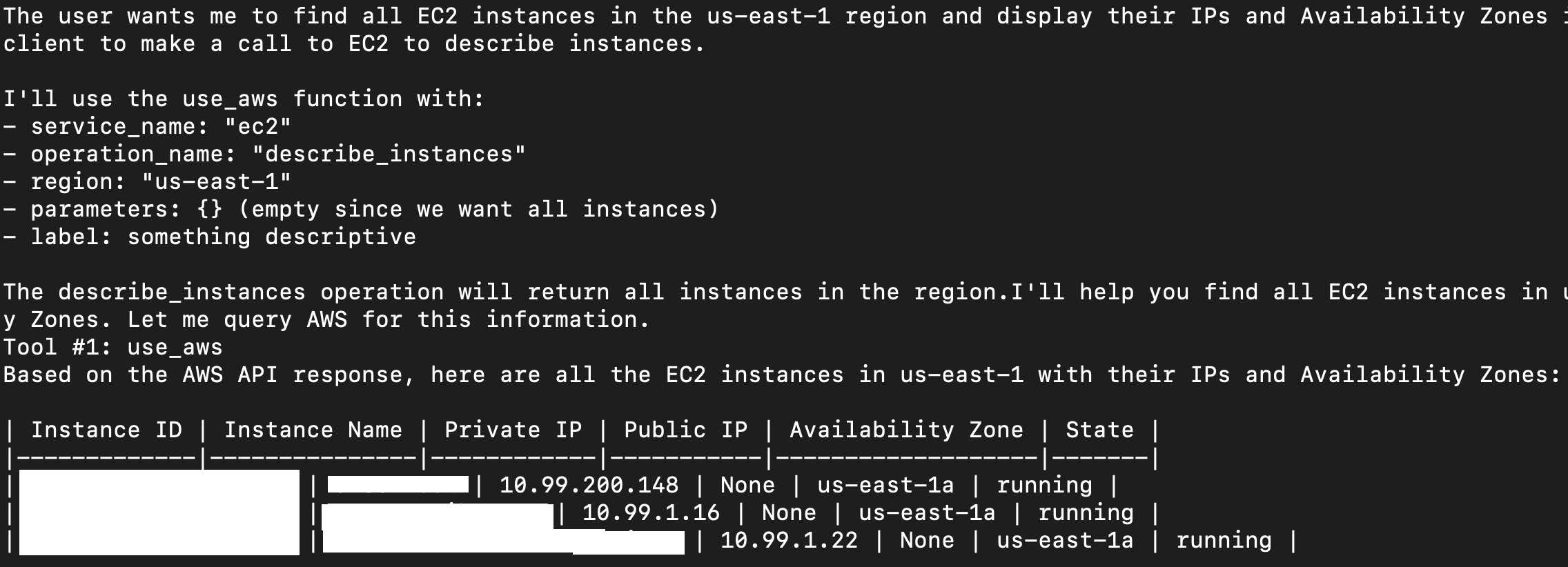
Simple AWS Bedrock Knowledge Base
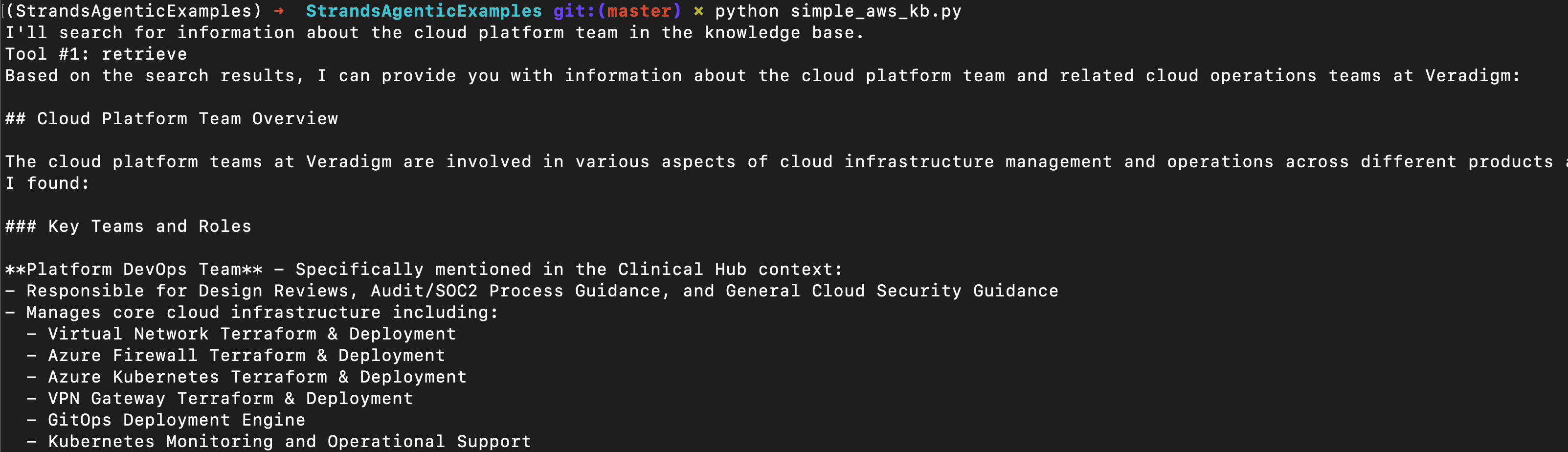
I built a pretty extensive Knowledge Base on Bedrock for Vera - a GenAI bot that doesn’t operate agentically. So when I read that Strands permits it to talk to Bedrock I expected I’d have to build a ton of code, and re-ranking, and such.
However, it’s incredibly easy. I had to export the ID of the knowledge base:
export KNOWLEDGE_BASE_ID=xxxxxxAnd then I had to import the “retrieve” tool, which retrieves information from Bedrock knowledge bases. I pass it like any other tool to the agent, and we’re in business.
Notably, I already have AWS creds exported into this terminal, to utilize bedrock AI services, so I’m already authenticated. If you’re using a different back-end for AI services, make sure to also export AWS creds that can read the Bedrock KB.
| from strands import Agent | |
| from strands_tools import retrieve | |
| agent = Agent(tools=[retrieve]) | |
| agent("Tell me about the cloud platform team") |
Here’s how it looks:
Combined MCP
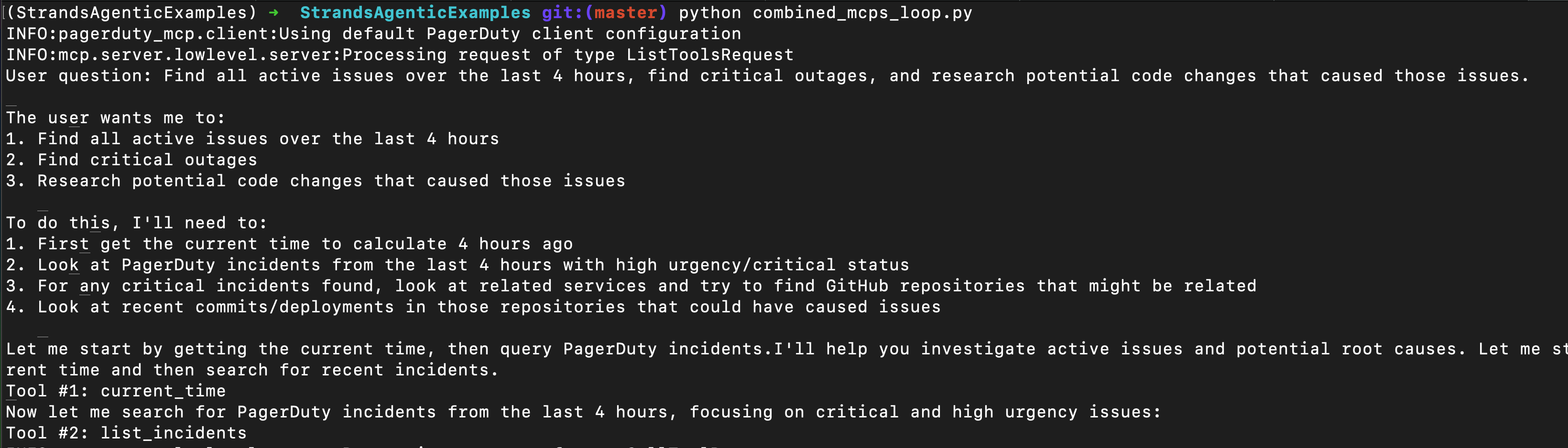
The real power of MCP comes when you combine multiple MCP tools across platforms, because the model can correlate, say, outages (Pagerduty) to specific code changes (GitHub).
This is pretty intuitive once you’ve seen it. I’ve skipped some code that we covered above where we built the MCP function definitions.
On line 2-3, we call those MCPs, and on line 6 we do a “with” to open each of them.
Then on line 12-13, we sync the tools available for both, and on line 16, we build our “tool_belt” (haha), to combine the list of all the tools together.
And then on line 19 we instantiate the agent and pass it all the tools.
| # Create MCP clients | |
| github_mcp_client = github_streamable_mcp_client() | |
| pagerduty_mcp_client = build_pagerduty_mcp_client() | |
| # Open tools and start chatting | |
| with github_mcp_client, pagerduty_mcp_client: | |
| # Configure bedrock model | |
| bedrock_model = configure_bedrock_model() | |
| # Inventory tools each MCP provides | |
| github_tools = github_mcp_client.list_tools_sync() | |
| pagerduty_tools = pagerduty_mcp_client.list_tools_sync() | |
| # Build "tool belt" lol | |
| agent_tools = github_tools + pagerduty_tools + [calculator, current_time, retrieve, use_aws] | |
| # Create agent with tools | |
| agent = create_agent(agent_tools) |
Here’s how it looks:
Summary
In this article we’ve covered how to build Strands agentic Agents with python. We’ve talked about how different types of MCPs work, and built them, and finished up with a multi-platform bot that’s able to:
Talk to PagerDuty to read your incidents
Talk to GitHub to read your code changes
Talk to AWS to read your real infrastructure
Talk to your AWS Bedrock Knowledge Bases to read your corporate data
And also, to correlate changes among those platforms - that’s going to be a really powerful functionality as we move forward in maturing this technology.
I’m going to keep building super bots, and I’m very interested in AgentCore to establish memory and runtime observability for these bots. I’ll be digging into that next, keep an eye out!
Good luck out there.
kyler