

This blog series focuses on presenting complex DevOps projects as simple and approachable via plain language and lots of pictures. You can do it!
These articles are supported by readers, please consider subscribing to support me writing more of these articles <3 :)
Hey all,
In the last series I wrote for LDD, we built an agentic Slack bot on AWS AgentCore. The architecture, MCP tools, memory, deployment. If you missed it, start here:

That series ended with a teaser about multi-agent orchestration. This is that series. We’re going to teach Claude Code to develop the bot itself. Implement features, review its own code, deploy to DEV, and test the live bot via Slack. All from a single prompt.
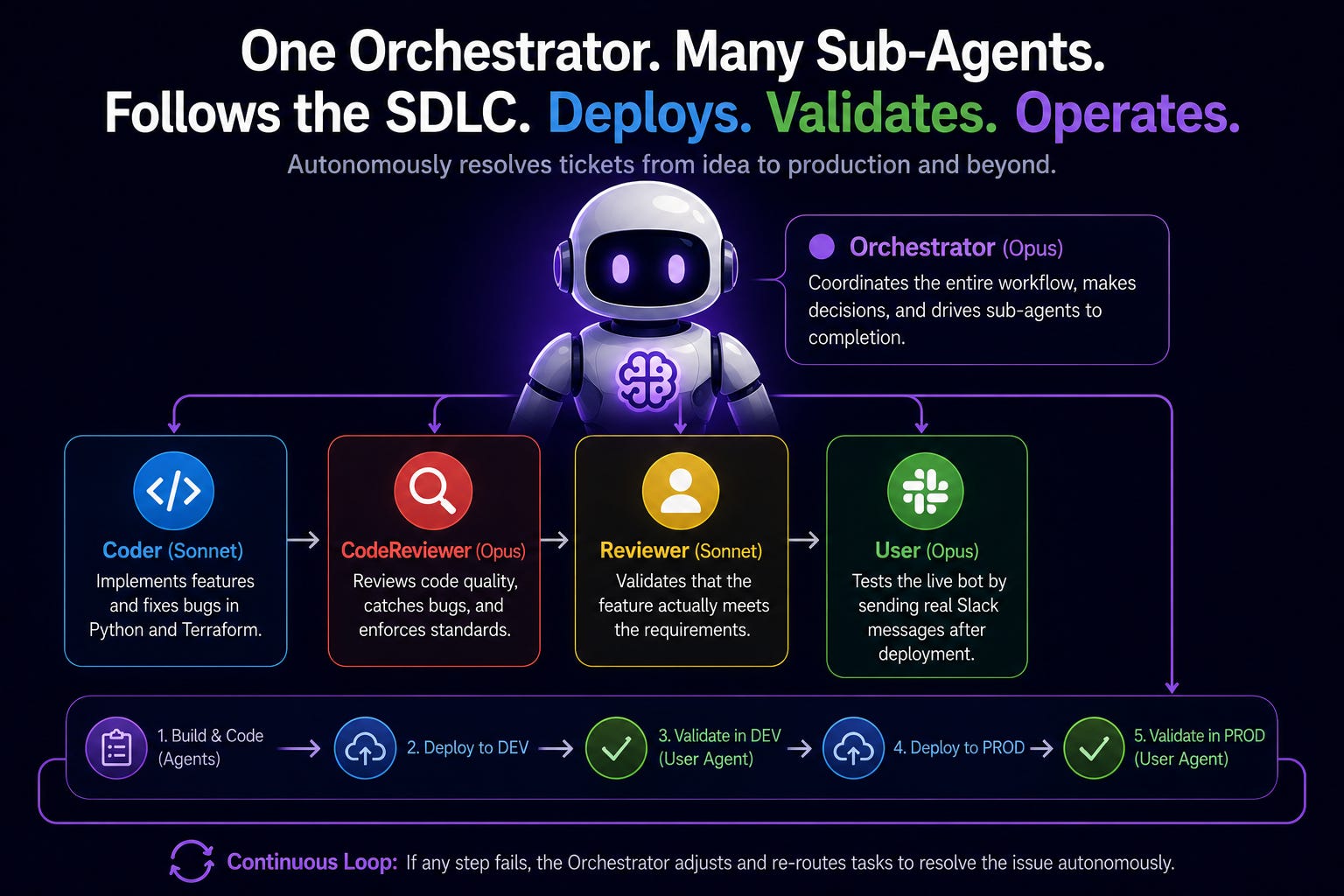
This first article covers the orchestrator pattern: how one CLAUDE.md file coordinates five agents through a full development pipeline, and how we codified our entire SDLC into config files that Claude Code follows autonomously.
If you want to skip the words and see the code, go here:
Codifying How Software Gets Built
Every team has a development process. You pick up a ticket, write some code, get it reviewed, deploy to a test environment, validate it works, push to prod. Most of that process lives in people’s heads or in a wiki page nobody reads.
What if you wrote it down in a format an AI agent could follow?
That’s what we did. We took our SDLC, the full lifecycle from Jira ticket to production deployment, and encoded it as a Claude Code skill. Ten phases, each with specific steps, specific tools to use, and specific checkpoints where it has to stop and validate before moving on.
The SDLC skill starts by reading the Jira ticket to understand what needs to be built. Then it calls the orchestrator workflow (which we’ll get to in a minute) to implement, review, and test the change. Then it pushes a PR, handles Copilot review comments, asks whether to force merge or wait for a human, monitors the CI/CD pipeline, validates in production, updates the Jira ticket, and cleans up test artifacts.
That’s ten phases. One command. `/sdlc`
Two of those phases have hard rules that can’t be skipped:
NEVER skip DEV testing. The bot has to respond correctly in DEV before anything gets pushed to GitHub.
NEVER skip PROD testing. After deployment, the bot has to be validated against the original issue.
Those are written in caps in the config file (I’ve been burned before).
This doesn’t guarantee that the bot will listen, but it seems to help.
Why the Main Agent Has to Be the Boss
Claude Code’s subagents can’t spawn other subagents. Only the main conversation agent, the one you’re talking to, has access to the `Agent` tool that creates new agents.
That means if you want a multi-agent workflow, the top-level agent has to coordinate everything. It’s the only one that can say “hey Coder, go implement this” and then “hey Reviewer, check their work.” The Coder can’t ask the Reviewer for help. The Reviewer can’t ask the Coder to fix something. Everything routes through the top.
This constraint makes the communication patterns cleaner and keeps your bots from spinning out in a way your orchestrator bot isn’t aware of. You get a single point of coordination, clear handoffs between agents, and a predictable flow. The orchestrator knows exactly what state the pipeline is in at all times because it’s managing every transition.
We put all the orchestration config in CLAUDE.md because CLAUDE.md is the one file Claude Code always loads into context at the start of every conversation. The agent always reads it. If the orchestration instructions are there, the agent always knows how to coordinate.
The first line sets the tone:
## You Are the Orchestrator
You are the Orchestrator Agent. When asked to implement features,
fix bugs, or make changes that involve code modifications, follow
the orchestrator workflow below to coordinate sub-agents through the
full pipeline: implement -> review -> deploy -> test.
For simple questions, research, or non-code tasks, respond directly
without invoking the orchestrator workflow.
That last line is the escape hatch. Without it, asking “what does this function do?” would trigger a five-phase development pipeline. You don’t want that.
The Agent Lineup
Five agents, each with a specific job and a color. The colors matter. When you’ve got five agents producing output in the same terminal, you need to know at a glance who said what.
🔵 Coder (sonnet) - Implements features and fixes bugs in Python and Terraform
🔴 CodeReviewer (opus) - Reviews code quality, catches bugs, enforces standards
🟡 Reviewer (sonnet) - Validates that the feature actually meets the requirements
🟢 User (opus) - Tests the live bot by sending real Slack messages after deployment
🟣 Orchestrator (opus) - Coordinates the whole workflow. This is the main agent.
Notice the model split. The Coder and Reviewer run on Sonnet. It’s fast, good at following instructions, and cheaper. The CodeReviewer and User run on Opus because they’re making judgment calls. “Is this code safe?” and “Did the bot respond correctly?” are harder questions than “implement this feature per the spec.” The orchestrator itself runs on Opus because it needs to interpret verdicts and make routing decisions.
Every agent’s output in the terminal is prefixed with its color emoji. When you see a red circle in the output, that’s the CodeReviewer talking. When you see blue, the Coder is working. It sounds small but it makes a real difference when you’re watching a 20-minute autonomous pipeline run.
The Pipeline
Here’s the workflow the orchestrator follows:
Phase 1: Coder implements
           |
Phase 2: CodeReviewer reviews -> CHANGES_REQUESTED? -> back to Phase 1
           | APPROVED
Phase 3: Reviewer validates feature completeness -> INCOMPLETE? -> back to Phase 1
           | APPROVED
Phase 4: Deploy to DEV (/deploy-worker-dev) -> FAILED? -> back to Phase 1
           | SUCCESS
Phase 5: User tests live bot via Slack -> UX_NEEDS_WORK? -> back to Phase 1
           | UX_APPROVED
         COMPLETE
Every phase can fail. Every failure loops back to the Coder. The Coder fixes the issue, and the pipeline re-runs from the review phase. This can happen up to three times before the orchestrator gives up and reports to the human. Three cycles is enough to catch most issues without getting stuck in an infinite loop.
There’s an optimization baked in: Phases 2 and 3 run in parallel. The CodeReviewer and the Reviewer are looking at different things, code quality vs feature completeness, so there’s no reason to run them sequentially. The orchestrator spawns both at the same time and waits for both results.
Each phase produces a structured verdict. Not a paragraph of feedback. A specific string the orchestrator can branch on. APPROVED or CHANGES_REQUESTED. FEATURE_APPROVED or FEATURE_INCOMPLETE. UX_APPROVED or UX_NEEDS_WORK. This is what makes autonomous orchestration work. If agents returned freeform text, the orchestrator would have to interpret whether “looks good but I have a few concerns” means approved or not.
Spawning an Agent
When the orchestrator kicks off a phase, it uses Claude Code’s `Agent` tool. Here’s what the Coder spawn looks like:
Agent(
  description=”Implement [feature]”,
  subagent_type=”coder”,
  prompt=”TASK: [description]
ACCEPTANCE CRITERIA: [criteria]
FILES: [relevant paths]
Implement and verify.”
)
The `subagent_type` maps to an agent definition file in `.claude/agents/`. That file controls which tools the agent gets, which model it runs on, and what instructions it follows. The orchestrator doesn’t need to repeat all that config. It just says “use the coder agent” and provides the task-specific context.
Before spawning, the orchestrator reads the codebase to understand context. It greps for relevant patterns, reads the files that’ll need changes, and then writes a prompt that gives the Coder everything it needs. A well-written spawn prompt is the difference between the Coder nailing it on the first try and thrashing for three cycles.
The Progress Report
After each cycle, the orchestrator prints a progress report. It looks like this:
Development Cycle Report
Date: 2026-05-16
Code Review
- CodeReviewer: APPROVED
- Reviewer: APPROVED
Deployment
- Status: SUCCESS
- Environment: DEV
Live Bot Testing
- Test 1 (feature validation): PASS
- Test 2 (regression): PASS
- User Verdict: UX_APPROVED
You can scan that in five seconds and know exactly what happened. Which agents ran, what they decided, whether the deploy worked, whether the bot responded correctly. Compare that to reading through pages of terminal output trying to figure out if things went well.
Summary
The full code is open source:
https://github.com/KyMidd/AgentCore_AgenticSlackBot
Deep links:
Next up, we’ll go inside the agent files themselves. How model selection, tool scoping, and output contracts make the pipeline reliable. That’s where the design decisions get interesting.
Happy Automating!
kyler