

This blog series focuses on presenting complex DevOps projects as simple and approachable via plain language and lots of pictures. You can do it!
These articles are supported by readers, please consider subscribing to support me writing more of these articles <3 :)
Hey all!
In this 4th and last article in the AgentCore series, we’ll talk about real life deployment, operations, and lessons learned while building this project. Here are links to the other articles in the series:
Part 2 - AgentCore MCP Gateway
Part 3 - AgentCore Memory and Tools
Part 4 (this article) - AgentCore Deployment, Operations, and Lessons Learned
Deploying an AgentCore runtime isn’t like deploying a Lambda function. There’s a container to build, a two-Lambda architecture to wire up, module boundaries to get right in Terraform, and a regional split that will trip you up if you’re not expecting it. Once it’s running, the operational model is different too. Your bot is a long-lived application now, not a function that spins up and dies. That changes how you think about health checks, debugging, cost, and failure modes.
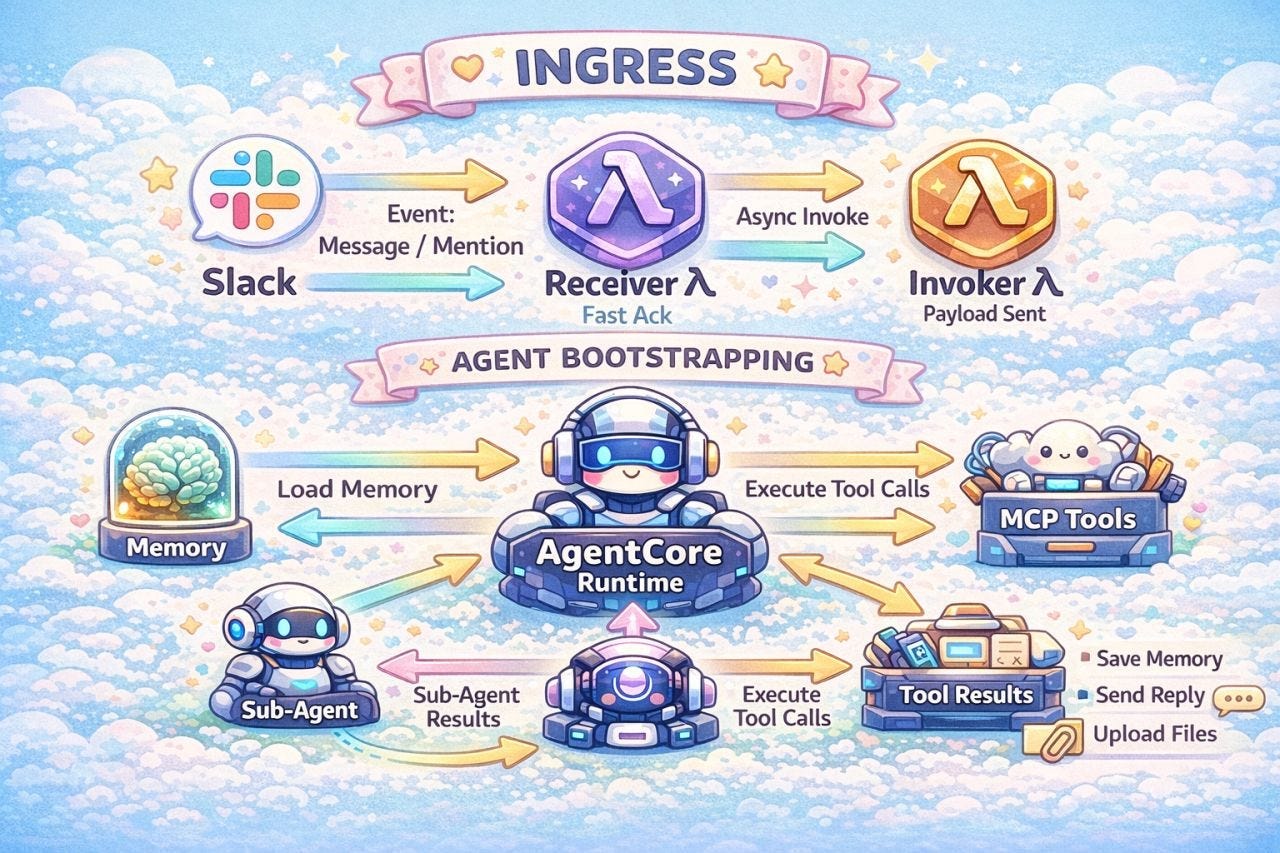
This article walks through the Terraform patterns that hold everything together, what container lifecycle actually looks like in practice, how to debug when things go wrong, and an honest look at what I’d do differently if I started over. If you’ve been following along and thinking about building your own AgentCore agent, this is the practical stuff you’ll want before you start.
Let’s get into it.
Terraform Deployment Patterns
The whole project is structured as Terraform modules. Each component is its own module with its own variables, IAM roles, and resources. The root `main.tf` wires them together:
module “gateway”    { source = “./gateway”    }  # MCP Gateway + Cognito
module “receiver”   { source = “./receiver”   }  # Slack webhook handler
module “invoker”    { source = “./invoker”    }  # Async AgentCore caller
module “worker”     { source = “./worker”     }  # AgentCore runtime
module “auth_portal” { source = “./auth_portal” }  # Per-user OAuth flows
Data flows one direction: gateway outputs feed into the worker, the worker’s runtime ARN feeds into the invoker, and the invoker’s function name feeds into the receiver. Each module only gets the permissions and configuration it needs.
# main.tf - wiring it together
module “invoker” {
  source            = “./invoker”
  agent_runtime_arn = module.worker.runtime_arn  # Worker feeds invoker
}
module “receiver” {
  source                = “./receiver”
  invoker_function_name = module.invoker.invoker_function_name  # Invoker feeds receiver
}
module “worker” {
  source            = “./worker”
  gateway_arn       = module.gateway.gateway_arn       # Gateway feeds worker
  gateway_client_id = module.gateway.cognito_client_id
  gateway_url       = module.gateway.gateway_url
  memory_id         = aws_bedrockagentcore_memory.vera_memory.id
  # ... 20+ more variables
}
That worker module has a lot of inputs. Gateway auth, memory config, knowledge base IDs, guardrail IDs, OAuth table references, audit log settings. It all gets passed as environment variables on the AgentCore runtime resource. This is the glue between infrastructure and application code. The worker’s Python code reads `os.environ.get(”GATEWAY_CLIENT_ID”)` and never knows or cares that Terraform set it.
The two Lambdas are deliberately minimal. The receiver is a single Python file zipped and deployed directly, no Docker, no build pipeline. 512MB memory, 10-second timeout, ARM64. Its only job is to validate the Slack signature and asynchronously invoke the invoker. The invoker is even smaller, 256MB, and its only job is to call `InvokeAgentRuntime`. Both run on ARM64 for the cost savings since Graviton Lambda is about 20% cheaper than x86.
# Receiver: tiny, fast, validates Slack webhooks
resource “aws_lambda_function” “receiver” {
  memory_size   = 512
  timeout       = 10
  runtime       = “python3.12”
  architectures = [”arm64”]
}
# Invoker: even tinier, calls AgentCore
resource “aws_lambda_function” “invoker” {
  memory_size   = 256
  timeout       = 900  # Matches Lambda max, waits for AgentCore
  runtime       = “python3.12”
  architectures = [”arm64”]
}
The invoker’s 900-second timeout might look surprising. It’s set to the Lambda maximum because it’s making a synchronous call to AgentCore and waiting for the response. The agent can take minutes on complex queries. If the invoker times out before the agent finishes, the response gets lost. Setting it to max is cheap insurance since the invoker uses almost no memory and you only pay for execution time.
The worker container build is where things get more interesting. We use a content-hash tagging strategy so the container only rebuilds when the code actually changes:
locals {
  # Hash all Python source files
  python_files_hash = sha256(join(”“, [
    for f in fileset(”${path.module}/src”, “*.py”) :
    filesha256(”${path.module}/src/${f}”)
  ]))
  # First 12 chars of hash as image tag
  image_tag = substr(local.python_files_hash, 0, 12)
  image_uri = “${var.ecr_repository_url}:${local.image_tag}”
}
Every Python file, the Dockerfile, and `requirements.txt` are hashed. If nothing changes, the tag stays the same and `null_resource.build_and_push_worker_image` doesn’t fire. If you change a single line of Python, you get a new hash, a new tag, and a new build. No “latest” tag guessing games, no manual version bumps. Terraform knows exactly when to rebuild.
The build itself targets ARM64 using `docker buildx`:
provisioner “local-exec” {
  command = <<EOF
    docker buildx build \
      --platform linux/arm64 \
      --output=type=registry,compression=gzip,force-compression=true \
      -t ${local.image_uri} \
      --push .
  EOF
ARM64 containers on AgentCore use Graviton instances, same cost savings as the Lambdas. The `--output=type=registry` pushes directly to ECR without storing a local image, which keeps CI/CD clean.
One thing that caught me off guard: the regional split. AgentCore, memory, guardrails, and the gateway all run in us-east-1. But the Bedrock Knowledge Base is in us-west-2. At the time I set this up, not all Bedrock features were available in every region. The knowledge base needed a region where the embedding model was available, and that was us-west-2. The worker handles this with a separate region variable:
# providers.tf - two regions
provider “aws” {
  region = var.region  # us-east-1: AgentCore, gateway, memory
}
provider “aws” {
  alias  = “west2”
  region = “us-west-2”  # Knowledge Base only
}
It works, but it means IAM policies need to cover both regions, and you need to be deliberate about which provider each resource uses. If you’re starting fresh, check if your region supports everything first. A single-region deployment is much simpler.
Container Lifecycle and Operational Reality
In Article 1, I talked about AgentCore’s “living application” model in the abstract. Now that I’ve been running it in production for a few months, here’s what it actually looks like.
The lifecycle is controlled by two values:
variable “idle_timeout” {
  description = “Idle runtime session timeout in seconds”
  type        = number
  default     = 900   # 15 minutes
}
variable “max_lifetime” {
  description = “Maximum runtime lifetime in seconds”
  type        = number
  default     = 28800 # 8 hours
}
`idle_timeout` is how long the container sits idle before AWS shuts it down. `max_lifetime` is the absolute ceiling, no matter how busy it is. After 8 hours, the container gets recycled and the next request spins up a fresh one.
The 15-minute idle timeout might seem short, but it’s a balance between responsiveness and cost. During business hours, Vera gets enough traffic to stay warm. After hours, the container shuts down within 15 minutes and you stop paying. The next morning’s first message takes a cold start penalty, about 30-45 seconds while the container boots, loads dependencies, fetches secrets, initializes MCP connections, and registers with AgentCore. After that, requests are fast.
Here’s the thing about cold starts though. With Lambda, a cold start was maybe 5-10 seconds for a lightweight function. AgentCore’s cold start is heavier because you’re booting a full Docker container with Python, MCP servers, Node.js (for Azure MCP), the OpenTelemetry instrumentation, and the AWS CLI MCP server. Look at the Dockerfile and you can see why it takes a bit:
# System deps: Node.js for Azure MCP, .NET libs, curl, etc.
RUN apt-get update && apt-get install -y \
    ca-certificates curl tar gzip nodejs npm \
    libicu-dev libssl3 zlib1g libgcc-s1 libstdc++6 libc6
# Azure MCP server
RUN npm install -g @azure/mcp@0.5.8
# Python dependencies
RUN pip install --no-cache-dir -r requirements.txt
# AWS CLI MCP server in its own venv
RUN mkdir -p /opt/aws-cli-mcp-server && \
    cd /opt/aws-cli-mcp-server && \
    uv venv && \
    uv pip install --python .venv/bin/python awslabs.aws-api-mcp-server
That’s a lot of stuff in one container. Vera talks to six or seven different platforms, and each one has its own runtime dependencies. Having these all ready to go means each reqeust is faster.
Once the container is warm, the application loop is straightforward. The `BedrockAgentCoreApp` handles health checks and request routing. When a request comes in, it hits the `@app.entrypoint` handler:
@app.entrypoint
def handle_slack_message(payload):
    # Start a background thread so we don’t block health checks
    task_id = app.add_async_task(”slack_message_processing”, {...})
    def process_in_background():
        try:
            handle_message_event(...)
        except Exception as error:
            # Post error to Slack so users aren’t left hanging
            slack_app.client.chat_postMessage(
                channel=channel_id, text=error_message, thread_ts=thread_ts
            )
        finally:
            app.complete_async_task(task_id)
    thread = threading.Thread(target=process_in_background, daemon=True)
    thread.start()
    return {”status”: “processing”, “task_id”: task_id}
I didn’t want to do background threads - they were required by AgentCore’s architecture. My lambda-built design was built to handle a single thread at a time, because who cares, each request uses a single lambda. There’s no need to have background threads and multi-tenancy, because... well, there isn’t multi-tenancy. That isn’t the case here. The blocking processing of a thread meant the heartbeat that AWS AgentCore sends to our application stops responding, and AgentCore thinks our application has died, and AgentCore’s service recycles the app - not great.
A background thread has a great benefit - it’s worked asynchronously, and the heartbeat process can continue responding even when working many requests.
Now, the cost question. Lambda is pay-per-invocation. You pay for exactly the compute time your function uses. AgentCore is pay-per-container-hour. You pay for the container running, whether it’s processing a request or sitting idle.
For a bot like Vera with steady weekday traffic, the costs end up similar. During business hours, the container is warm and handling requests efficiently. After hours and weekends, it shuts down after 15 minutes of inactivity. You’re not paying for 24/7 uptime.
Where Lambda wins is low-traffic bots. If your bot handles 5 requests a day, Lambda’s pay-per-invocation model is cheaper than keeping a container warm. AgentCore’s idle timeout helps, but there’s still the overhead of cold starting multiple times a day.
For Vera’s usage pattern of hundreds of users, dozens of requests per hour during business hours, and near-zero after hours, the cost is roughly the same. I didn’t migrate for cost savings. I migrated for the features.
Debugging and Observability
Debugging in AgentCore was a HUGE PAIN. When I first migrated, I couldn’t get the stdout messages to appear in cloudwatch at all. I thought I had to depend on x-ray and OpenTelemetry (OTEL), and that situation is just horrible. I wanted to like the OTEL observability stack and how it’s currently implemented in AWS but I just can’t. Clicking through literally thousands of events to find the failure straight up sucks.
After debugging for hours, I found out that python BUFFERS ITS OUTPUT to cloudwatch, sometimes for the entire duration of the container, and then it dies without writing to cloudwatch.
Adding the `python -u` to the invocation of the app makes it logs to stdout without buffering. This has a (very tiny) impact on perforamcne, but it means that the APP GENERATES LOGS which are absolutely necessary to run any damn thing.
The OpenTelemetry setup is one line in the Dockerfile:
CMD [”opentelemetry-instrument”, “python”, “-u”, “-m”, “worker_agentcore”]That `opentelemetry-instrument` wrapper auto-instruments boto3 calls, HTTP requests, and other common libraries. You get traces in X-Ray showing the full lifecycle of a request: Bedrock Converse API calls, Secrets Manager fetches, MCP tool invocations, Slack API posts. When a request takes 4 minutes and you want to know why, X-Ray shows you which tool call was slow.
I don’t like to use .logging(), I literally just have a `DEBUG_ENABLED` environment variable that turns on stdout print() logging. In production it’s off, but when something weird happens, you can flip it on and get full request/response bodies logged:
debug_enabled = os.environ.get(”DEBUG_ENABLED”, “False”)
# In the Converse API call
if debug_enabled == “True”:
    print(f”converse_body: {converse_body}”)
Error handling follows the same philosophy of telling users what happened. Vera categorizes errors into three buckets and gives specific guidance for each:
THROTTLING_KEYWORDS = [”throttl”, “rate limit”, “too many requests”, ...]
CONTEXT_OVERFLOW_KEYWORDS = [”context window”, “too many tokens”, ...]
if is_context_overflow:
    return “Request was too large... try narrowing your request”
elif is_throttling:
    return “High demand, please try again in a few minutes”
else:
    return “Unexpected error, please try again”
Context window overflows happen more often than you’d expect. When Vera analyzes a large Jira board with hundreds of tickets, the accumulated tool responses can blow past the model’s context limit. The error message tells users to narrow their request, like limiting to a specific sprint or date range, which has cut down on repeat failures.
The Strands SDK quirk I mentioned in the memory article also shows up in debugging. Short-term memory events that contain malformed or empty messages cause the Strands memory interface to crash rather than gracefully discarding them. The workaround is to use unique session IDs per message so that corrupted short-term memory from one conversation can’t bleed into the next. It’s not elegant, but it’s reliable. If you see mysterious crashes during message processing with no obvious cause, check your session ID strategy first.
This bug will likely be fixed in the Strands Memory interfact client soon, but until then you can remove conversation turns that are empty which MCP tools sometimes generate, then memory didn’t crash. It only took me 5 hours of debugging to figure that out.
What I’d Do Differently and What’s Next
I’ve been running Vera on AgentCore in production for a few months now, serving hundreds of users across Slack, Teams, and Email.
Things I’d do the same: the module-per-component Terraform structure, the hash-based image tagging, the background thread pattern, ARM64 everywhere, and the three-Lambda architecture (despite this being quirky as all get out, it works great). These patterns have held up well and I’d use them again on a new project without hesitation.
Things I’d do differently:
Start with a single region. The us-east-1/us-west-2 split was necessary at the time because of Bedrock feature availability, but it added complexity to every IAM policy and every debugging session. Check regional availability before you commit to a multi-region setup. If you can fit everything in one region, do it.
Don’t underestimate the Dockerfile. Every MCP server you add brings its own runtime: Node.js for Azure, a Python venv for AWS CLI, pip packages for everything else. The Dockerfile grew fast and so did the cold start time. If I were starting fresh, I’d think harder about which MCP servers truly need to be local (stdio) versus remote, because every local server is another dependency baked into your container image.
Now, what’s next. AgentCore supports multi-agent orchestration, where a supervisor agent delegates to specialist agents, each with their own tools and context windows. I haven’t implemented this yet, but the architecture is clearly heading there. Imagine a “manager” agent that routes questions to a GitHub specialist, a Jira specialist, and an incident response specialist, each optimized for their domain. The pieces are all there in AgentCore. I just haven’t needed it yet because Vera handles the current workload as a single agent.
The MCP Gateway is also evolving. When AWS adds broader bearer token support for gateway targets, the direct MCP connections for GitHub, Atlassian, and Splunk can all move to the gateway. That means less auth code in the application, fewer secrets to manage, and adding a new tool provider becomes a Terraform resource instead of a code change.
If you’re considering building an agentic bot on AWS today: if your workflows fit within Lambda’s 15-minute timeout and you don’t need persistent memory or a managed tool gateway, Lambda with the Strands SDK is simpler and cheaper. It works great. But if you’re hitting the timeout wall, or you want memory that persists across conversations, or you’re tired of managing credentials for six different MCP servers in application code, AgentCore is worth the migration.
The code for this entire project is open source: https://github.com/KyMidd/AgentCore_AgenticSlackBot. Feel free to poke around, steal ideas, or open issues when things don’t make sense.
Happy building!
kyler