

This blog series focuses on presenting complex DevOps projects as simple and approachable via plain language and lots of pictures. If you find these useful, please consider subscribing. It’s what keeps these articles coming. <3
Hey all! I’ve been building an agentic email bot on AWS Bedrock AgentCore that reads and replies to emails autonomously. I wrote up that whole series:
Part 1: Full Architecture and O365 Integration - EventBridge polling, Graph API delta queries, and handing off to AgentCore
Part 2: Building the Thread, Sending the Reply - Conversation context, email-safe HTML rendering, and production operations
While building it, I wired up Microsoft Graph API for O365 access so I could have my Claude Agent test and verify changes during development. That Graph integration became the foundation for something more immediately useful: a Claude Code skill that lets you send email directly from a conversation.
Later, in a Slack channel dedicated to using AI, someone asked if anyone had a solution to allow Claude Code to send emails, specifically for automations like emailing reports on a schedule. So I pulled it out, made it portable, and published it to our internal plugin marketplace.
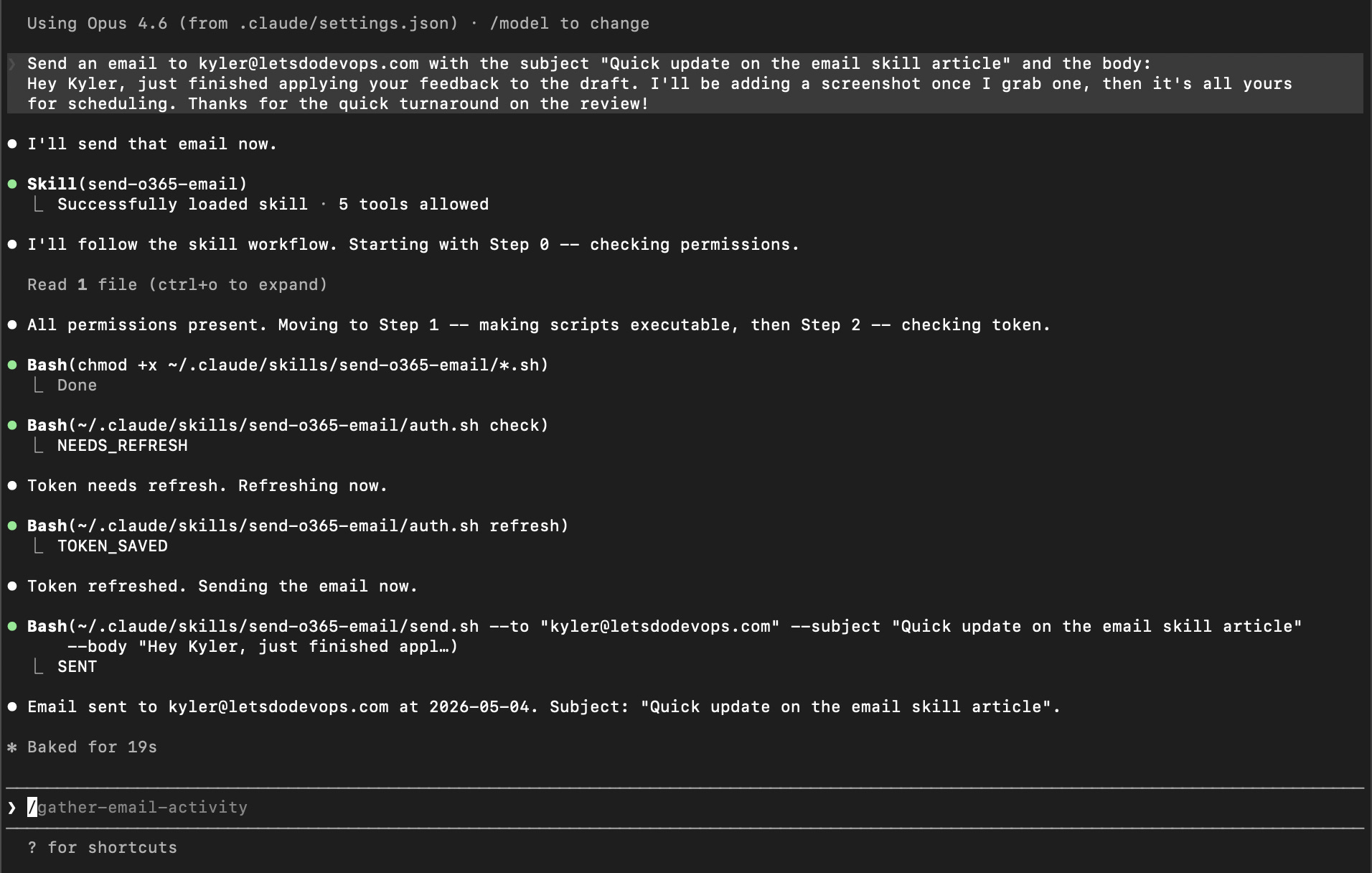
There are a lot of good reasons to want this. You might be testing email-related functionality, like I was, or you want to say “email Sarah and update her on our progress with this project” and have Claude just handle it in context. Or you’re running scheduled jobs and need Claude to fire off a notification or send a report when something completes. Once you have it, you find uses for it constantly. (I also use the email access in general to leverage Claude in a custom daily review process to help me stay on top of tasks and such, but that’s a story for another blog post.)
The idea sounds simple enough. The implementation had some genuinely interesting constraints that made it worth writing up.
The Problem: O365, Two Operating Systems, Zero Dependencies
Many enterprises use O365, so Microsoft Graph was the obvious choice for sending mail. However, developers are often split across Mac and Windows, with some folks on WSL and Git Bash too, so how to go about using the Microsoft Graph was a bit trickier.
If the skill needed to run across different operating systems and Claude Code setups, minimizing dependencies was key. I challenged myself (and Claude) to write this skill while only using tools like curl, awk, grep, and date that ship with every Mac, Linux, WSL, and Git Bash environment by default.
The Solution: Microsoft Graph API + Device Code OAuth
The send side is straightforward: Microsoft Graph has a POST /me/sendMail endpoint that takes a Bearer token and a JSON payload. Pure curl, no library needed.
Auth is the interesting part. The skill needed to work headlessly for scheduled automations, so a browser redirect flow was out. Microsoft’s device code flow fits perfectly: you get a short code, visit a URL once to sign in, and from that point on a refresh token handles everything silently. That token is good for up to 90 days, so day-to-day use never touches auth at all.
Implementation: The Auth Script
All the auth logic lives in auth.sh, a POSIX shell script with four modes: check, refresh, device-start, and device-poll.
check is what Claude runs first every time. It reads the cached token and returns one of three signals: TOKEN_VALID, NEEDS_REFRESH, or NEEDS_AUTH. Claude branches on that output and knows exactly what to do next.
if [ "$CMD" = "check" ]; then
  NOW=$(date +%s)
  EXPIRES_AT=$(get_number expires_at "$TOKEN_FILE")
  REFRESH_TOKEN=$(get_field refresh_token "$TOKEN_FILE")
  if [ -n "$EXPIRES_AT" ] && [ $(( EXPIRES_AT - NOW )) -gt 600 ]; then
    echo TOKEN_VALID
  elif [ -n "$REFRESH_TOKEN" ]; then
    echo NEEDS_REFRESH
  else
    echo NEEDS_AUTH
  fi
  exit 0
fi
The full script including helpers, token save, and refresh logic is in the gist below.
GIST: auth.sh - check, refresh, and token caching
The device code flow is intentionally split into two commands. device-start requests the code and exits immediately, printing the URL and code for the user. Then Claude waits for confirmation before running device-poll, which polls Microsoft until the token comes back or a 5-minute timeout hits.
if [ "$CMD" = "device-start" ]; then
  RESP=$(curl -s -X POST "https://login.microsoftonline.com/${TENANT}/oauth2/v2.0/devicecode" \
    -H "Content-Type: application/x-www-form-urlencoded" \
    -d "client_id=${CLIENT}&scope=${SCOPE}")

  # ...parse response...

  echo "VISIT_URL:${VERIFICATION_URI}"
  echo "USER_CODE:${USER_CODE}"
  exit 0
fi
The full device-start and device-poll flow, including the 5-minute polling timeout, is in the gist below.
GIST: auth.sh - device-start and device-poll
Splitting start from poll is what makes the UX clean. Claude tells you exactly what to do, you do it, you say done, and Claude picks right back up. No guessing, no waiting in silence.
Tokens live at ~/.config/claude-o365/token.json with chmod 600, same as AWS CLI and GitHub CLI credentials. Access tokens last about an hour, refresh tokens up to 90 days. After the first login every send is fully silent.
Implementation: The Send Script
send.sh does the actual work: parse args, build JSON, call the API. Most of it is straightforward. The edges are where it gets interesting.
Multi-recipient was the first question. --to and --cc both take comma-separated addresses, so --to "alice@co.com,bob@co.com" just works. Attachments hit a weird one. I tried attaching a Mac screenshot during testing and the send failed. Turns out macOS puts a Unicode narrow no-break space (U+202F) between the time and AM/PM in screenshot filenames. Looks like a regular space, breaks a normal file check. The fix is to glob it: if the exact path doesn’t resolve, replace spaces with * and let the shell find it. Annoying to discover, trivial to fix.
# If the exact path doesn't resolve, glob it to handle Unicode spaces
RESOLVED="$2"
if [ ! -f "$RESOLVED" ]; then
  GLOB=$(printf '%s' "$2" | sed 's/ /*/g')
  RESOLVED=$(eval 'ls -- '"$GLOB"' 2>/dev/null' | head -1)
fi
if [ -z "$RESOLVED" ] || [ ! -f "$RESOLVED" ]; then
  echo "ERROR: attachment not found: $2" >&2
  exit 1
fi
The full argument parser and validation logic is in the gist below.
GIST: send.sh - argument parsing and multi-recipient handling
The body gets JSON-escaped with pure awk before it goes in the payload – newlines, quotes, tabs, all of it.
json_escape() {
  printf '%s' "$1" | awk '{
    gsub(/\\/, "\\\\")
    gsub(/"/, "\\\"")
    gsub(/\t/, "\\t")
    gsub(/\r/, "\\r")
    lines[NR] = $0
  } END {
    for (i = 1; i <= NR; i++) printf "%s%s", lines[i], (i < NR ? "\\n" : "\n")
  }'
}
The full payload builder, including recipient JSON construction, base64 attachment encoding with MIME detection, and the Graph API call, is in the gist below.
GIST: send.sh - JSON payload build, attachment encoding, and macOS path fix
The script always exits with one of three signals: SENT, TOKEN_EXPIRED, or ERROR:.... That keeps SKILL.md simple. Claude branches on the output without having to parse error messages.
Packaging as a Plugin
The skill ships as a plugin in a public repo. Two commands to install:
/plugin marketplace add YOUR_GITHUB/claude-code-tools
/plugin install o365-email@claude-code-tools
After that, just ask Claude to send an email and it handles the rest. No slash command needed, drop a file in alongside your request and it attaches automatically.
Updates are one command too. When we fix something, run /plugin marketplace update YOUR_GITHUB/claude-code-tools and you’re current. No manual file copying, no wondering if you’re on an old version.
For headless use the skill can add its own permissions to ~/.claude/settings.json on first run, scoped to just its own scripts. One restart and it’s fully silent from that point on.
Lessons Learned
POSIX shell is underrated. Reaching for
curlandawkinstead of a language runtime kept the dependency surface at zero. More verbose, but it works everywhere.Split your interactive steps from your waiting steps. The device code flow’s two-command design made the user-facing interaction clean. One message, one action, one confirmation.
Test with real data early. The Unicode space bug in macOS screenshot filenames only surfaced when I tried attaching an actual screenshot. Synthetic test paths would never have caught it.
Headless-first is a design goal, not an afterthought. We knew from day one this needed to work in automation and cron jobs. That shaped every decision: token caching, signal-based output, the permissions setup flow.
Summary
This started as a Graph API integration I built for an email bot and turned into a skill the whole team uses. The interesting part wasn’t the sending, that’s just a curl call. It was making auth work headlessly across Mac and Windows with zero dependencies, handling the weird edge cases (looking at you, macOS screenshot filenames), and packaging it so anyone can install it in two commands. If you’re on O365 and want Claude to be able to send email, this is a pretty solid starting point.
The code for this skill is open source: GitHub. Feel free to poke around, steal ideas, or open issues when things don’t make sense.
Good luck out there.
Alex Moore