
AgentCore: Memory and Tools (3/4)🔥
aka, be a teammate, not just a chat bot

This blog series focuses on presenting complex DevOps projects as simple and approachable via plain language and lots of pictures. You can do it!
These articles are supported by readers, please consider subscribing to support me writing more of these articles <3 :)
Hey all!
In the last article, we covered how Vera connects to tool providers through the MCP Gateway and direct connections. Now let’s talk about something that makes AgentCore feel genuinely different from Lambda: memory.
This article is part of a series:
Part 2 - AgentCore MCP Gateway
Part 3 (this article) - AgentCore Memory and Tools
Part 4 - AgentCore Deployment, Operations, and Lessons Learned
This is persistent memory that survives across conversations, across days, across sessions. Not only can users teach the bot to call them a nickname, users can teach Vera multi-step business processes: “When I ask for standup notes, check Jira for my tickets, pull my recent PRs from GitHub, and summarize my Confluence updates from the past week.” Once learned, Vera executes that workflow every time without the user repeating the instructions. In the first month of deployment, Vera memorized roughly 2,000 facts across our user base, including work patterns, team structures, preferred workflows, and procedural preferences.
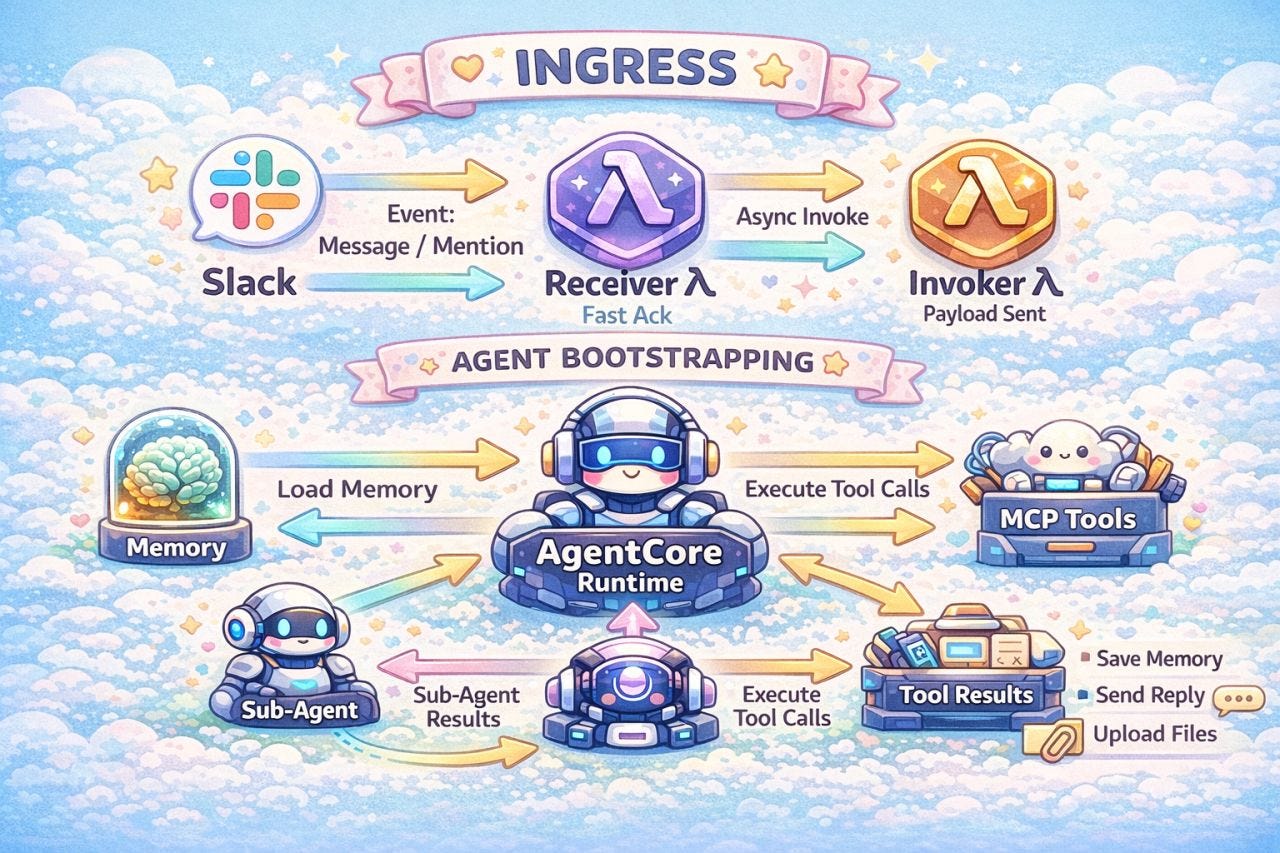
This is one of those features where the “learning AI” model really pays off. In Lambda, every invocation starts with a blank slate. You can bolt on memory by writing to DynamoDB or S3, but you’re building and maintaining that whole system yourself. AgentCore gives you a managed memory service with strategies, namespaces, and semantic search out of the box.
AgentCore memory has two layers that work together. Short-term memory events capture each conversation as it happens. A backend process then analyzes those events and extracts durable facts and preferences into long-term memory records. This article covers both layers, how we use the user preference strategy to give Vera per-user memory, the identity model that ties it all together, and the tools we built so users can see and control what’s been remembered about them.
Let’s get into it.
If you’d prefer to skip the write-up and just read the code, the entire codebase is public and MIT open sourced here.
Two Layers of Memory: Events and Records
AgentCore memory has two distinct layers, and understanding the difference is important because they serve very different purposes.
Short-term memory (events) are created during each interaction with the bot. When a user sends a message and Vera responds, that exchange gets written as an event. Events are the raw material. They capture what happened in a specific conversation, and they expire based on your configured TTL (Usually 7 days or so).
Long-term memory (records) are created by AgentCore’s backend processing system based on the memory strategy/strategies you configure. After events are written, AgentCore asynchronously analyzes them and extracts durable facts, preferences, and patterns. These get stored as memory records in a namespace you define. Records are the refined output. They’re what the bot actually retrieves and uses in future conversations.
Events (short-term): Created by each interaction. Contains raw conversation exchanges. Lifespan is a configurable TTL (we use 30 days).
Records (long-term): Created by the AgentCore backend. Contains extracted facts, preferences, and procedures. Lifespan is also a configurable TTL (we use 30 days).
Here’s the flow in practice:
A user tells Vera: “When I ask for standup notes, check Jira for my tickets and pull my recent GitHub PRs”
Vera writes that conversation as a short-term memory event
AgentCore’s backend asynchronously processes the event and extracts a long-term record: “User’s standup procedure: query Jira tickets, fetch GitHub PRs”
Days later, the user says: “Standup notes please”
Vera retrieves the relevant memory record, recognizes the learned workflow, and executes it
You don’t (and can’t!) write long-term memories directly. You have conversations, events get created, and AgentCore’s backend figures out what’s worth remembering. Your job is to configure the strategy that tells AgentCore what kind of things to extract.
Pro tip: It takes about a minute after the event is created for the record to be created. That’s usually fast enough, but I try to tell my users what to expect for the short turn-around time.
What Gets Remembered - Memory Strategies
AgentCore supports multiple memory strategies that you can configure on the AWS Memory resource. Each strategy tells the backend what to look for when processing events. I’ve only explored one so far: user preferences.
User preferences extract facts about individual users. Things like timezone, preferred tools, communication style, team membership, and procedural workflows. The strategy is keyed by actor ID, so each user gets their own isolated memory space.
Here’s the Terraform:
# The memory resource itself - shared across all strategies
resource “aws_bedrockagentcore_memory” “vera_memory” {
  name                      = “${title(var.region_short_code)}${title(var.account_short_code)}VeraMemory”
  event_expiry_duration     = var.session_ttl_days
  memory_execution_role_arn = module.worker.worker_task_role_arn
}
# User preferences strategy
# Extracts facts, preferences, and patterns from conversations
# Distinct for each user (keyed by actorId)
resource “aws_bedrockagentcore_memory_strategy” “user_preferences” {
  name                      = “${title(var.region_short_code)}${title(var.account_short_code)}UserPreferences”
  memory_id                 = aws_bedrockagentcore_memory.vera_memory.id
  type                      = “USER_PREFERENCE”
  namespaces                = [”/preferences/{actorId}”]
  memory_execution_role_arn = module.worker.worker_task_role_arn
}
Two things to notice:
The `event_expiry_duration` controls how long short-term events stick around. Events older than that get cleaned up automatically. This is the raw conversation data, and you probably don’t want it living forever.
The namespace pattern `/preferences/{actorId}` is where the magic happens. AgentCore replaces `{actorId}` with the actual user identifier at runtime, creating per-user memory isolation. My preferences live in `/preferences/kyler_middleton`. Someone else’s live in their own namespace.
Users don’t have the ability to fetch memories for others users - that’d be a scary thing to deploy, and is something I had to be careful not to permit
We plan to add a semantic knowledge strategy in the future. Where user preferences capture things specific to an individual (”my standup process”, “my timezone”), semantic knowledge would capture broader organizational facts that come up in conversations: “the deploy window is 2-4 PM EST” or “the staging environment uses us-west-2.” Knowledge that isn’t specific to a single user but is useful for the whole team. Adding it would mean a new strategy resource in Terraform with a different namespace path and including that namespace in the retrieval config.
Identity: Sessions and Actor IDs
Memory needs two identifiers to work correctly: a session ID that scopes short-term events, and an actor ID that scopes long-term records. Getting these right matters more than you’d think.
Here’s something that wasn’t obvious and cost me some debugging time. AgentCore uses the session ID to scope short-term memory. If you reuse the same session ID across multiple messages, the short-term memory accumulates every previous exchange. That sounds useful until you realize the agent replays all of that accumulated context on every new message, and it can corrupt the conversation state when messages from different contexts bleed together.
This shouldn’t have been necessary, but the memory interfact for the Strands agentic library that Vera is based on has some limitations for processing blank or malformed messages, and crashes rather than discarding them. I might try and fix this in future, but for now I’m just pruning invalid messages and separate short term memory streams.
I fixed it by giving every inbound message its own unique session ID.
def generate_session_id(body):
    event = body.get(”event”, {})
    # Use the unique message timestamp from Slack
    ts = event.get(”ts”, “”)
    if ts:
        # Replace periods with underscores for AWS regex compliance
        return f”msg_{ts.replace(’.’, ‘_’)}”
    # Fallback to UUID if no timestamp
    import uuid
    return f”msg_{uuid.uuid4()}”
Slack gives every message a unique timestamp like `1719432000.123456`. We convert that to `msg_1719432000_123456` (replacing periods with underscores because AWS’s regex validation doesn’t allow dots in session IDs).
This means every message is its own session from AgentCore’s perspective. Short-term memory doesn’t carry over between messages. But long-term memory absolutely does, because preferences are keyed by actor ID, not session ID.
And that’s the other half of the equation. The actor ID needs to be consistent across sessions. If I get actor ID `kyler_middleton` on Monday and `U12345678` on Tuesday, those memories live in different namespaces and the bot won’t remember Monday’s conversation.
We derive the actor ID from the user’s Slack profile name:
# Fetch the user’s Slack ID as fallback
actor_id = body[”event”][”user”]
# Extract real_name_normalized from Slack profile
real_name = (
    user_info_json.get(”user”, {})
    .get(”profile”, {})
    .get(”real_name_normalized”, “”)
)
if real_name:
    # Convert to lowercase and replace spaces with underscores
    actor_id = real_name.lower().replace(” “, “_”)
“Kyler Middleton” becomes `kyler_middleton`. This has a nice side effect: the namespace path `/preferences/kyler_middleton` is human-readable when you’re debugging. But it’s not perfect. Someone with a name change, or a name that normalizes differently between Slack and Teams, would end up with split memories. For now it works, and the fallback to the raw Slack user ID (`U12345678`) means we never fail entirely.
I use a “first_last” as the actor ID because it’s something I can correlate between Slack, Teams, and Email, so memory can be shared among all those platforms. And that is pretty darn cool.
Both identifiers get packed into the memory config that flows through the rest of the system:
The design is stateless short-term memory with stateful long-term memory. Each message gets a fresh session (no short-term memory event accumulation), but user preferences persist across every session via the actor ID.
Wiring Memory Into the Agent
The memory config flows into the agent through the Strands SDK’s session manager. This is where you configure which namespaces to retrieve from and how selective the retrieval should be:
from bedrock_agentcore.memory.integrations.strands.config import (
    AgentCoreMemoryConfig,
    RetrievalConfig,
)
from bedrock_agentcore.memory.integrations.strands.session_manager import (
    AgentCoreMemorySessionManager,
)
# Memory configuration
agentcore_config = AgentCoreMemoryConfig(
    memory_id=memory_config[”memory_id”],
    session_id=memory_config[”session_id”],
    actor_id=memory_config[”actor_id”],
    retrieval_config={
        # User preferences only - high relevance threshold
        “/preferences/{actorId}”: RetrievalConfig(
            top_k=5, relevance_score=0.7
        ),
    },
)
# Create session manager
session_manager = AgentCoreMemorySessionManager(
    agentcore_memory_config=agentcore_config, region_name=memory_region
)
# Pass to agent
agent = Agent(
    model=bedrock_model,
    system_prompt=system_prompt,
    tools=tools,
    session_manager=session_manager,
)
The `retrieval_config` is a dictionary keyed by namespace pattern. Memory is just a vector-based knowledge base (just like every other bedrock knowledge base you’ll use), so for each namespace, we set two parameters:
`top_k=5` means retrieve the 5 most relevant memory records. You don’t want to flood the agent’s context with every memory ever stored. Five is usually enough to capture the important preferences without noise.
`relevance_score=0.7` is the minimum similarity threshold. Memory retrieval uses semantic search under the hood, so this filters out memories that are vaguely related but not actually useful. If you’re finding the bot isn’t retrieving memories it should, lower this. If it’s pulling in irrelevant ones, raise it.
The session manager handles everything automatically. When the agent starts processing a message, it retrieves relevant long-term memories and injects them into context. When the conversation ends, it writes events back to short-term memory. You don’t call any memory APIs in your agent logic. It just works.
Giving Users Control: Memory Management Tools
When I first rolled this out, someone asked if the bot could delete wrong long-term memories, and I promised it could. I didn’t realize that was a lie - the Strands bot natively *cannot* delete memory records.
To address users wanting to remove some or all memories, I wrote a few Strands memory tools that let users remove specific or all memories.
I’m really loving strands tools. They’re not MCP based (which is a bummer) but they have deep integration into the user context of who launched them, so I can do sensitive things like fetch and delete memories.
I built these tools:
`list_my_memory_records` - A user can say “what do you remember about me?” and Vera will list every preference and fact that’s been extracted from their conversations.
`search_my_memories` - Runs semantic search against stored memories. “Do you remember my standup process?” will find the relevant record even if the stored text is worded differently.
`get_memory_record` - Retrieves the full details of a specific record by ID.
`delete_memory_record` - Removes a single memory. “Forget my standup workflow, I have a new process” will find and delete that specific record.
`delete_all_my_memories_in_namespace` - The nuclear option. This one has a two-step confirmation flow built into the tool itself:
All of these tools are scoped to the current user’s namespace by default:
default_namespace = f”/preferences/{actor_id}”The same actor ID that scopes memory retrieval also scopes the management tools.
Summary and What’s Next
This article walked through how AgentCore memory works at both layers: short-term events created by each conversation, and long-term records extracted asynchronously by the backend. We covered the user preference strategy and namespace isolation, how the Strands SDK session manager works, and the memory management tools that give users visibility and control over what the bot remembers.
Memory is the feature that transforms Vera from a tool into a teammate. The bot moves on from GenAI Q&A bot to teaching Vera how they work, and Vera remembers. With 2,000 facts learned in the first month across nearly 500 users, it’s clear that people want to teach their bot. They just need the capability.
The code for this entire project is open source: https://github.com/KyMidd/AgentCore_AgenticSlackBot. Feel free to poke around, steal ideas, or open issues when things don’t make sense.
Happy building!
kyler
Can someone in slack recall your long term memory by changing their name to your first_last? Hey Vera , what do you remember about me ?